Claude Code Without Coding · Section 9
Notes: Giving the Brain Hands
Follow the source, method and connected action, then inspect the result in the destination app.
 Arun Nagarathanam · 6 Oct 2026 Notes · 64 of 80 in this course
Lecture 9.1
What Can Claude Code Do With Your Apps?
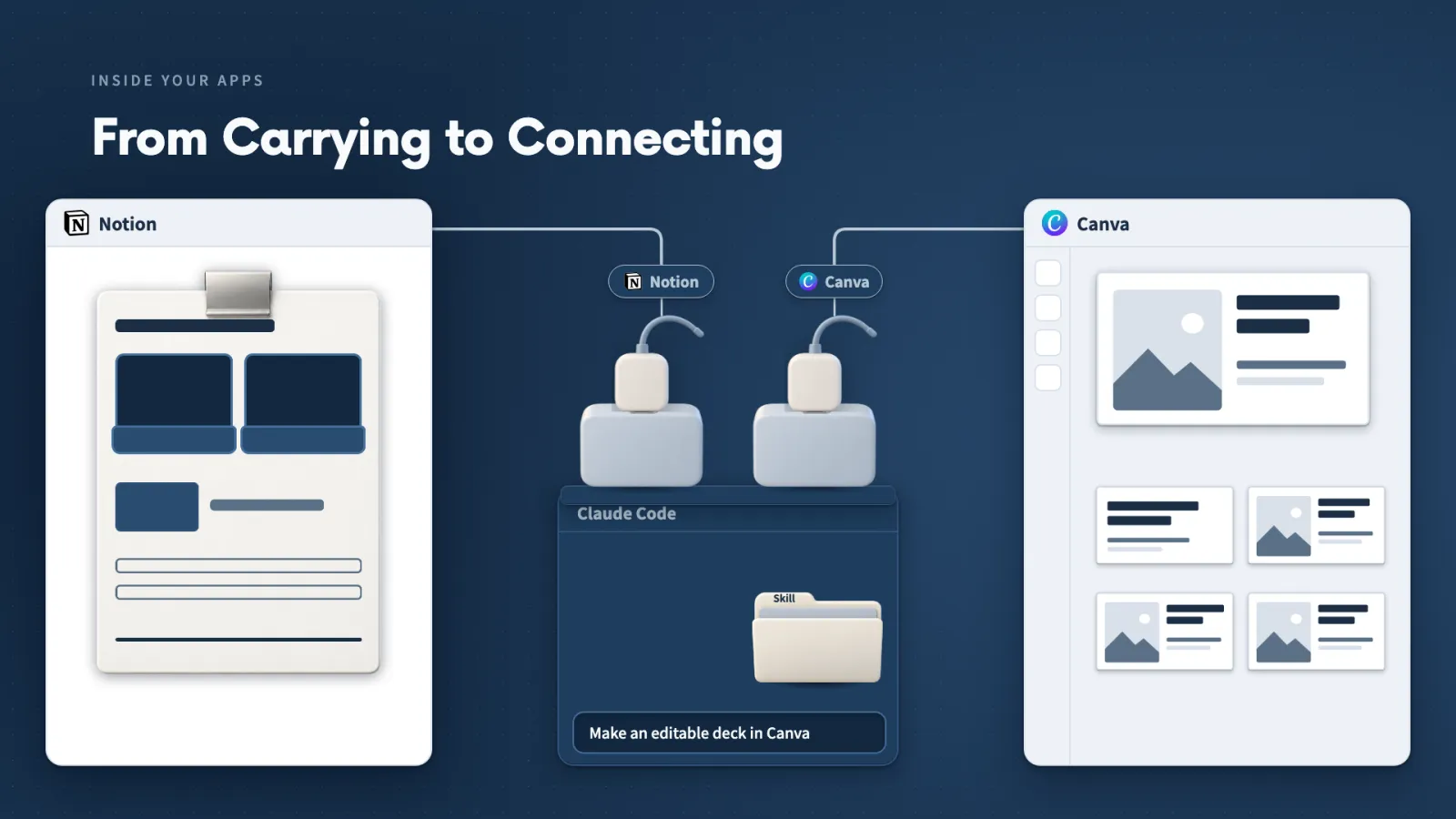
Once an app offers a supported connection, you stop copying between apps and describe the result you want. That has changed how I choose software.
Key ideas
- 01Supported connection: An app has to offer one before Claude can work inside it.
- 02Describe the result: I say what I want, and Claude retrieves the source, follows my method and creates the material in the destination app.
- 03Willow Desk: Our fictional desk-organizer business, with 12 practice comments on a Notion page, carries every example in this section.
- 04Choosing software: When two apps do the same job, the one that lets Claude work inside it gives me a reason to pick it.
Why it matters. When two apps do the same job, the one that lets Claude work inside it gives me a reason to pick it. I moved from two CapCut team licences to Palmier Pro, then to DaVinci Resolve once Blackmagic offered an official MCP connection.
I still inspect the timeline and the finished video myself, because I need to know the edit does what I meant.
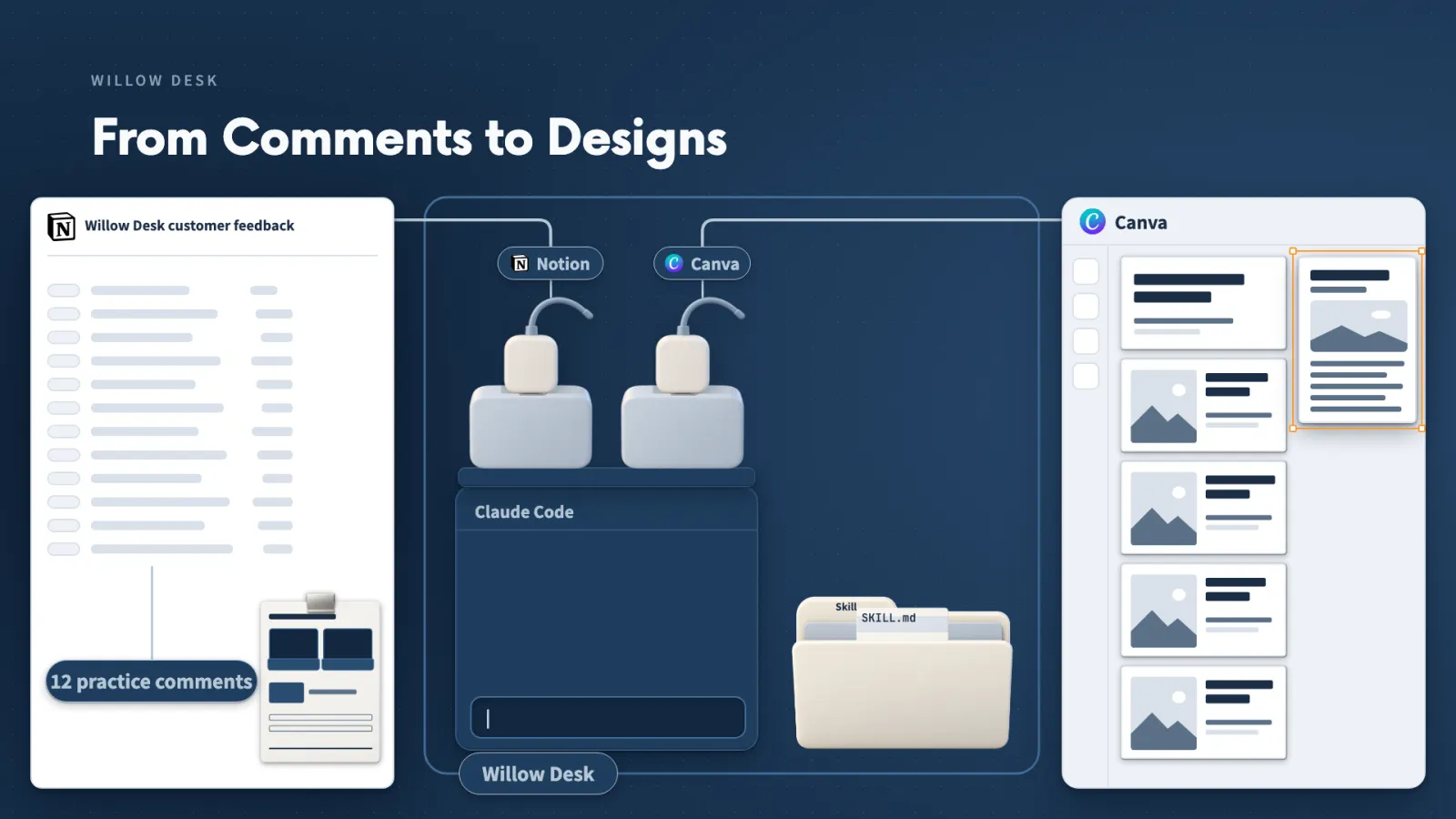
The same applies to software you build with Claude Code, without waiting for a directory listing. You can ask Claude to:
- research how to expose its useful operations through MCP
- build the connection
- test one real action
Start from the job you want done, then look for a connection that gives Claude the actions that job needs.
Lecture 9.2
What Does a Tool Add to Claude?
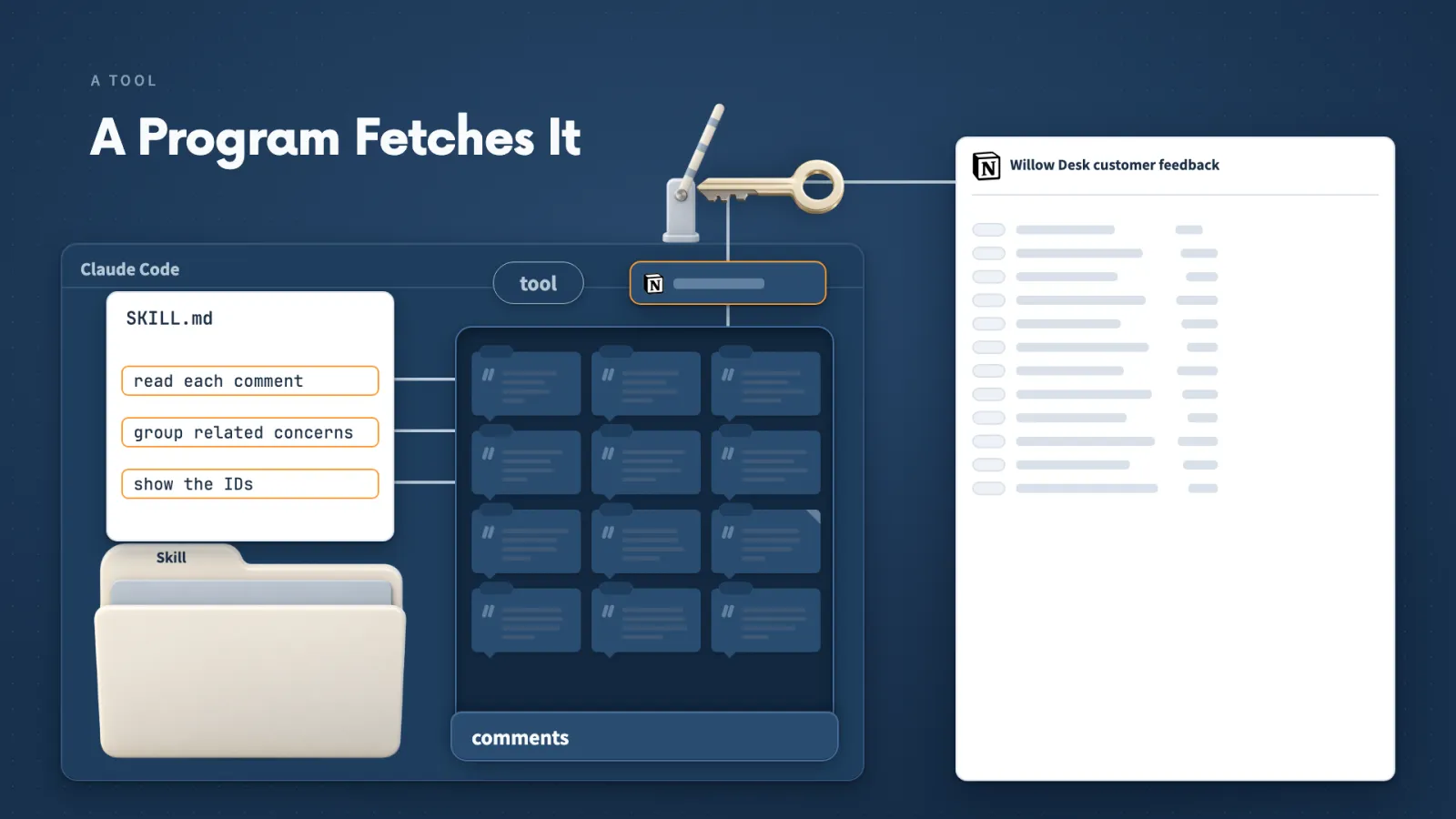
A Skill tells Claude how to work, but only a tool can reach outside the conversation. Knowing which is which lets you read any Claude Code conversation.
Key ideas
- 01Tool: An action Claude can call, such as reading a page or creating a design.
- 02Skill: A method for how to analyze, plan or design once Claude has the material.
- 03Prompt: What I want, in my own words.
- 04One connection, several tools: Finding a page, reading it and creating a new one can come from the same connection, and Claude picks the one that fits.
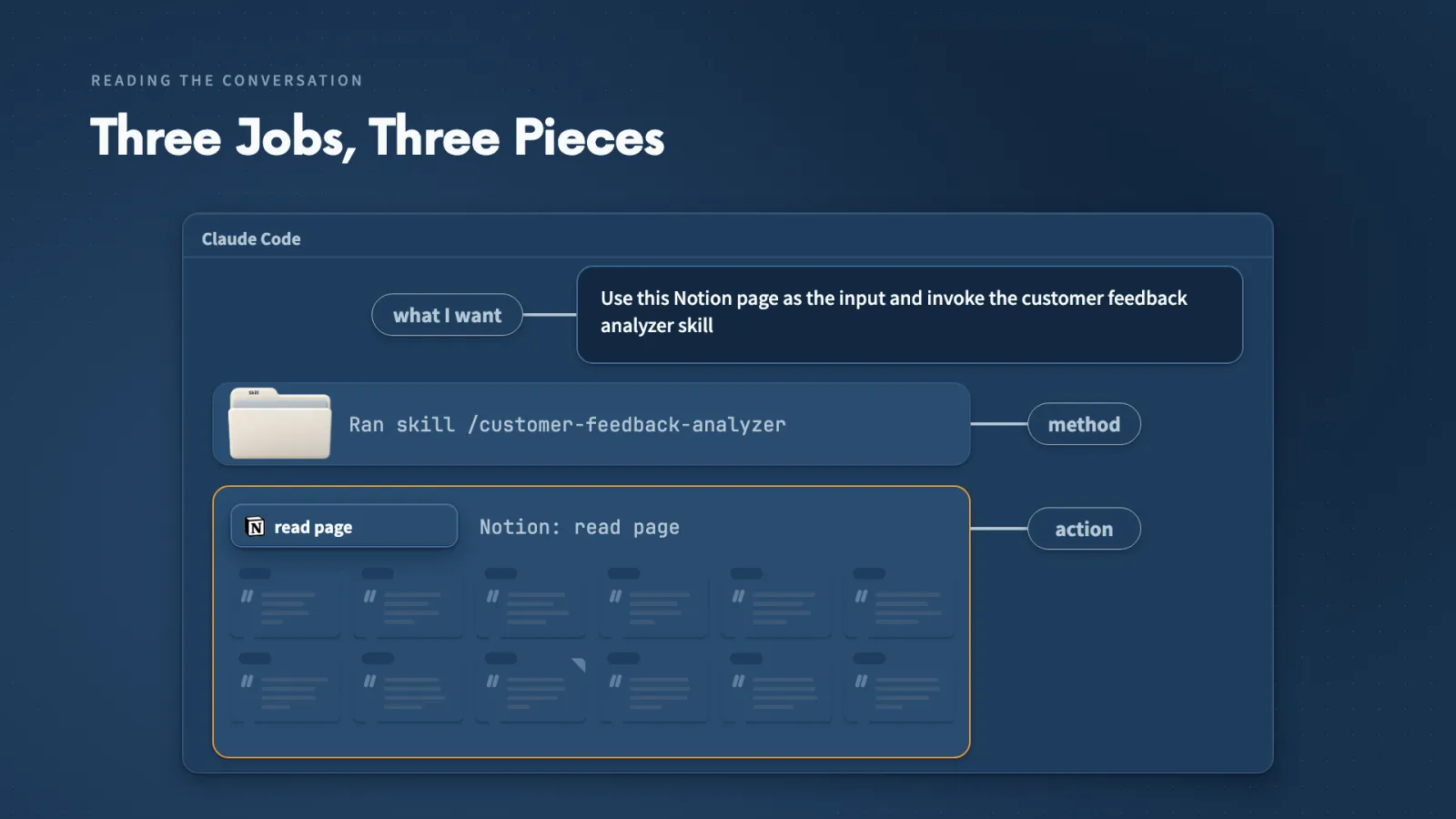
When I read a conversation back, I can tell three jobs apart:
- The prompt says what I want.
- The Skill supplies a method.
- A tool performs one action and returns something Claude can use.
Why the split matters. If the Notion page address is all Claude has, the Skill has nothing to analyze until a tool has read that page.
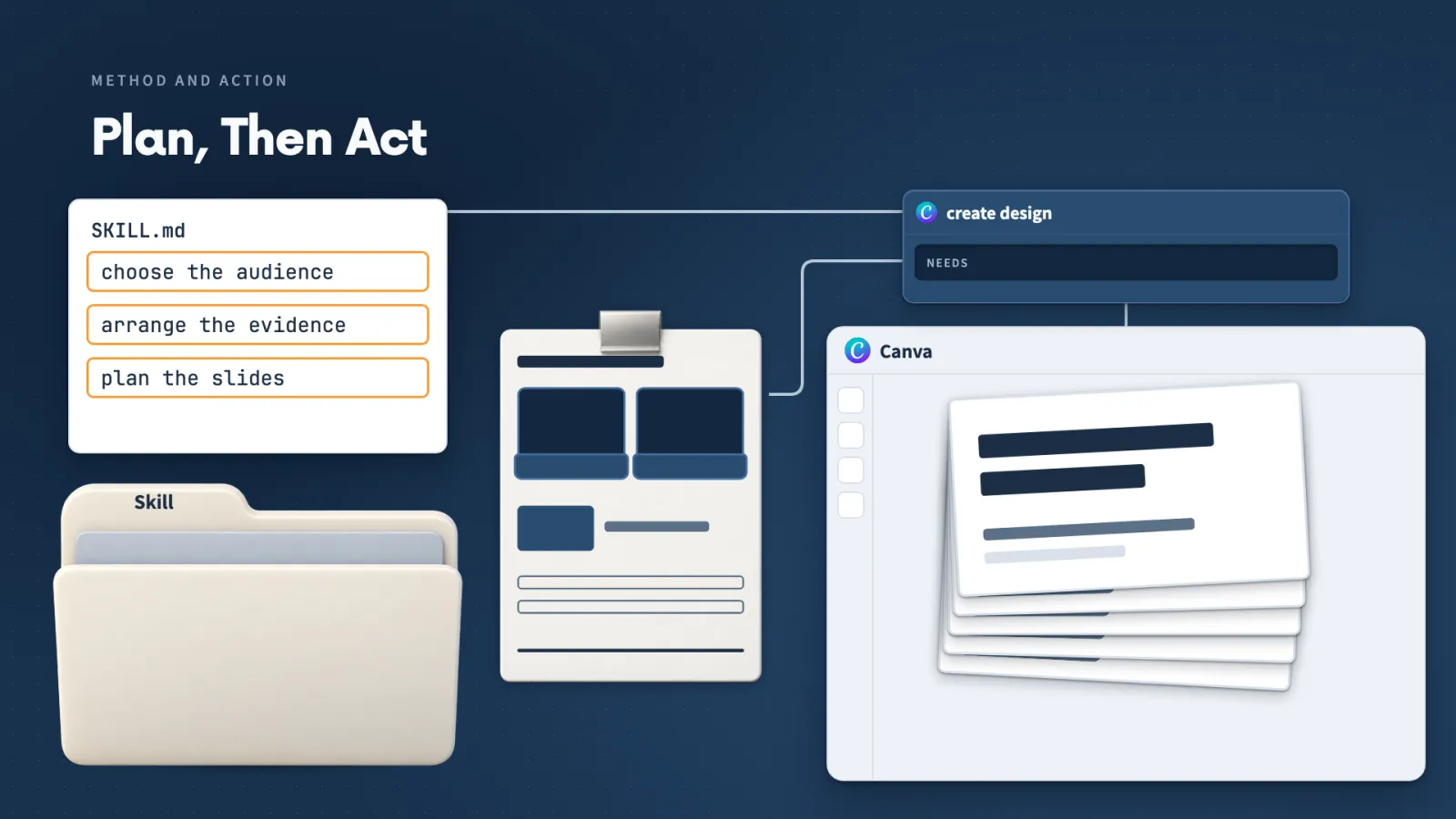
The same split shows up when the report becomes a presentation. The Skill decides the audience and how to arrange the evidence, and a Canva tool creates the design in my account.
Lecture 9.3
How Does Claude Reach Another App?
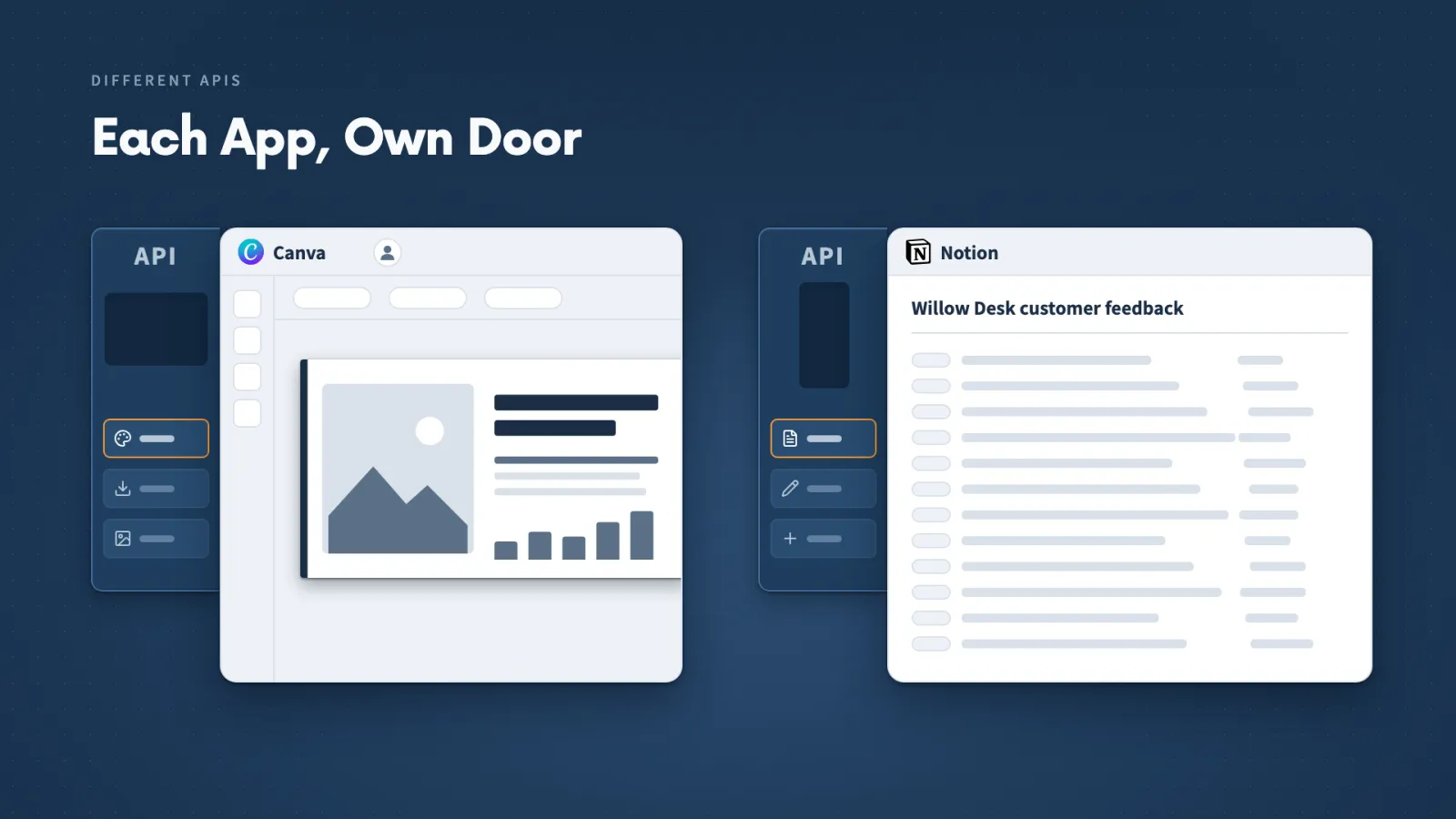
You will meet the words API, MCP server and connector on every app's setup page. Each means something specific, and they fit together in one chain.
Key ideas
- 01API: The way one program asks another app to do supported things and gets results back. Each app has its own.
- 02MCP and MCP server: MCP is a common format describing an app's actions, what each needs and what each returns. The MCP server is the program that offers them.
- 03Connector: How a ready-to-connect service appears in the desktop app, including sign-in.
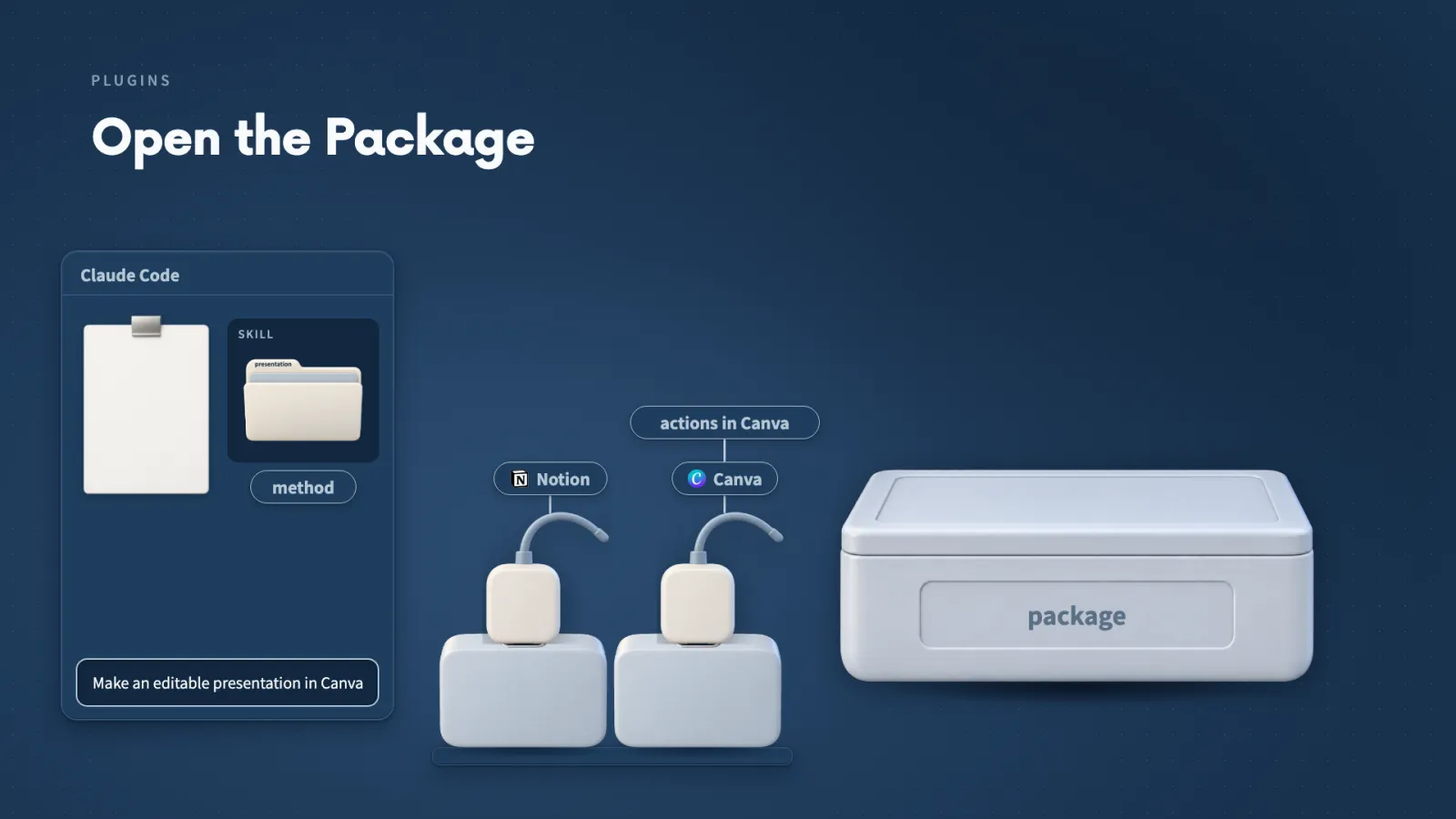
- 04Plugin: An installable package that can hold Skills, an MCP server or other helpers.
When I ask for a Canva deck, the request travels in four steps:
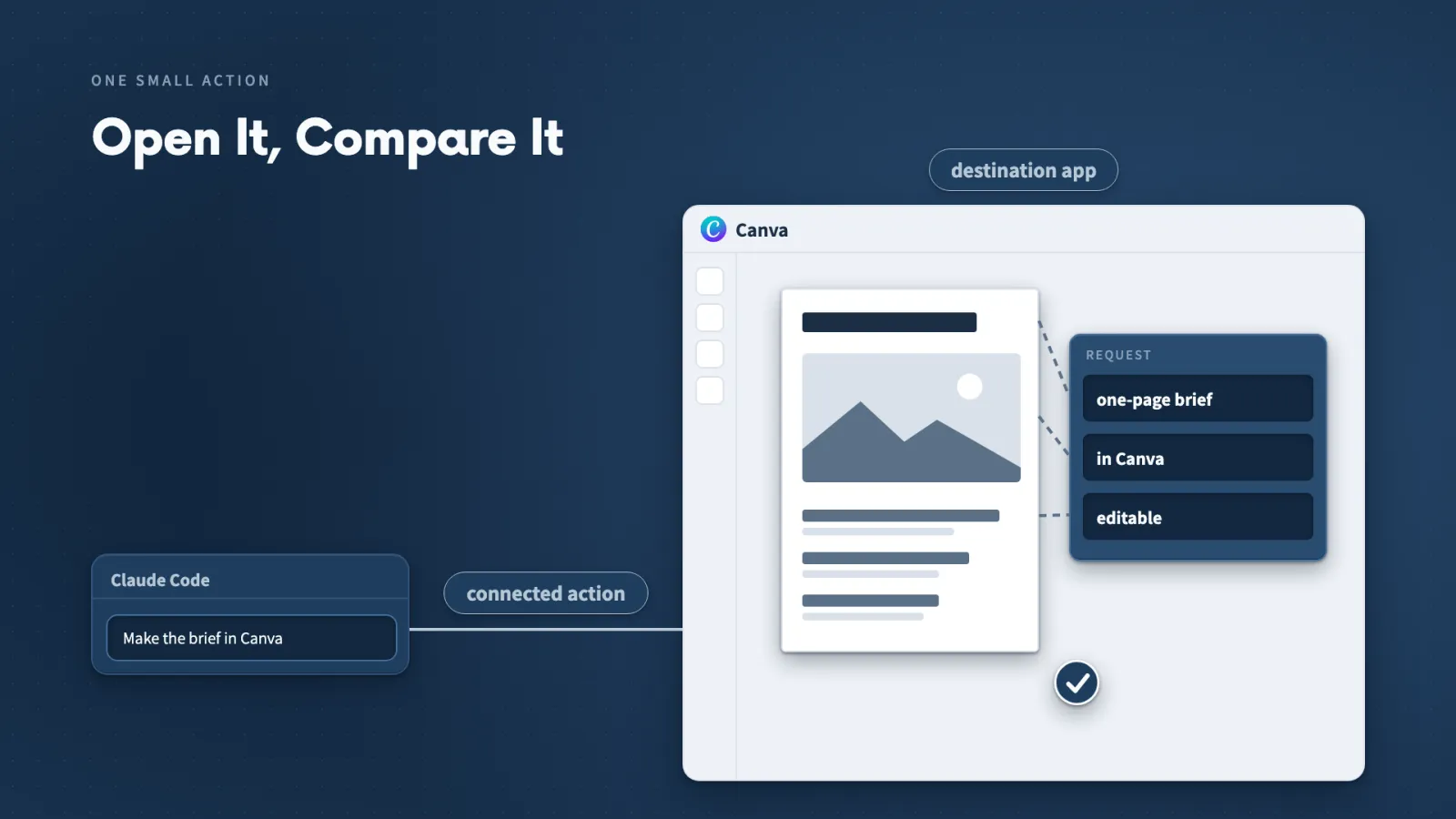
- Claude picks the create-design action and supplies the content.
- The MCP server passes the request to Canva.
- Canva builds the design in my authorized account.
- The result comes back for me to see.
Canva still decides which Canva actions exist, and Notion decides which Notion actions exist. MCP only gives Claude one common way to find and call them.
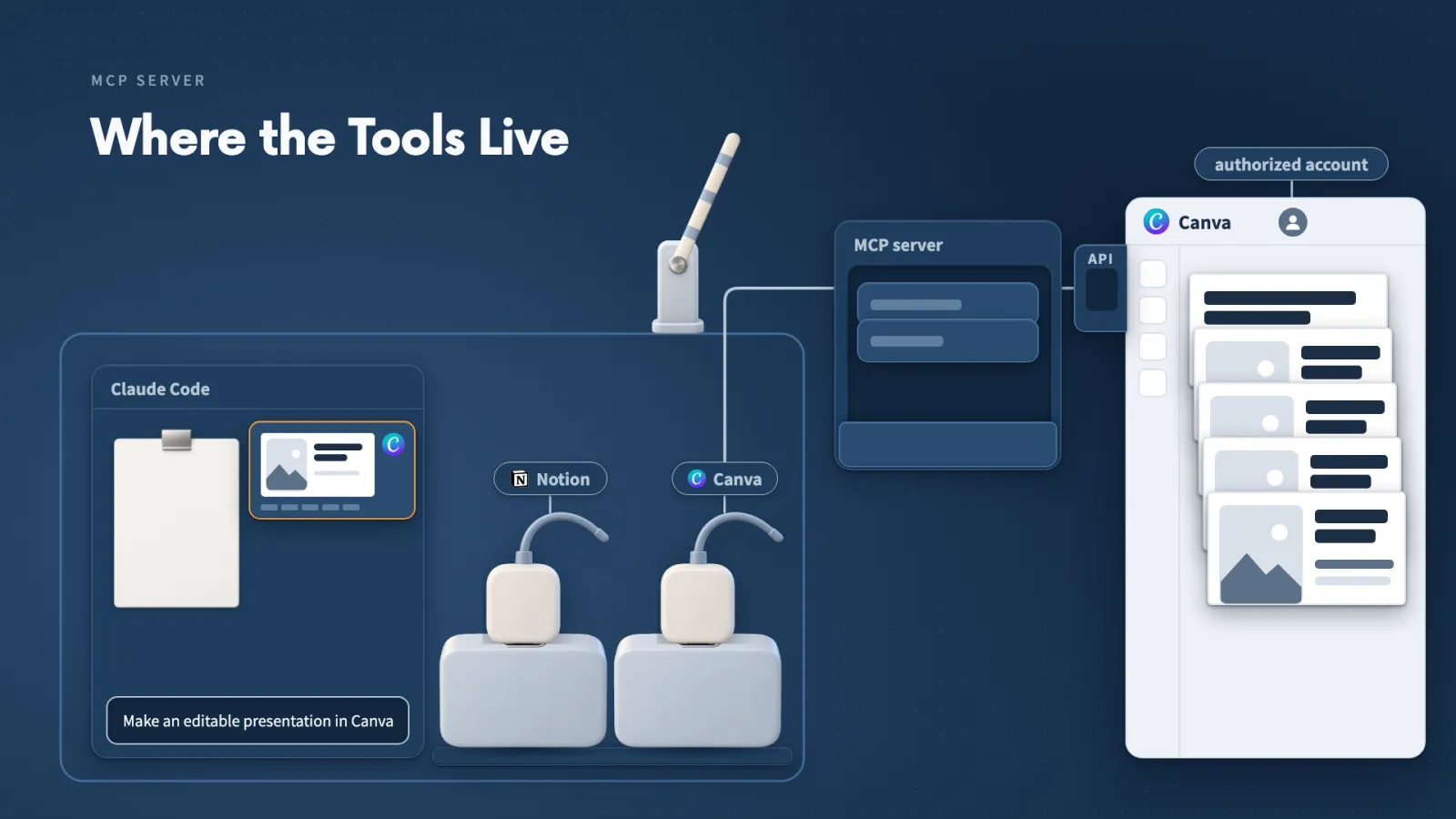
Where a server runs depends on the provider:
- Local: a program that Claude Code starts on my computer.
- Remote: a service that runs with the provider.
I follow the provider's setup instructions to see which one I have. Inside a plugin, the Skill supplies the method and the connection supplies actions in Canva.
Lecture 9.4
How Does Claude Choose a Tool?
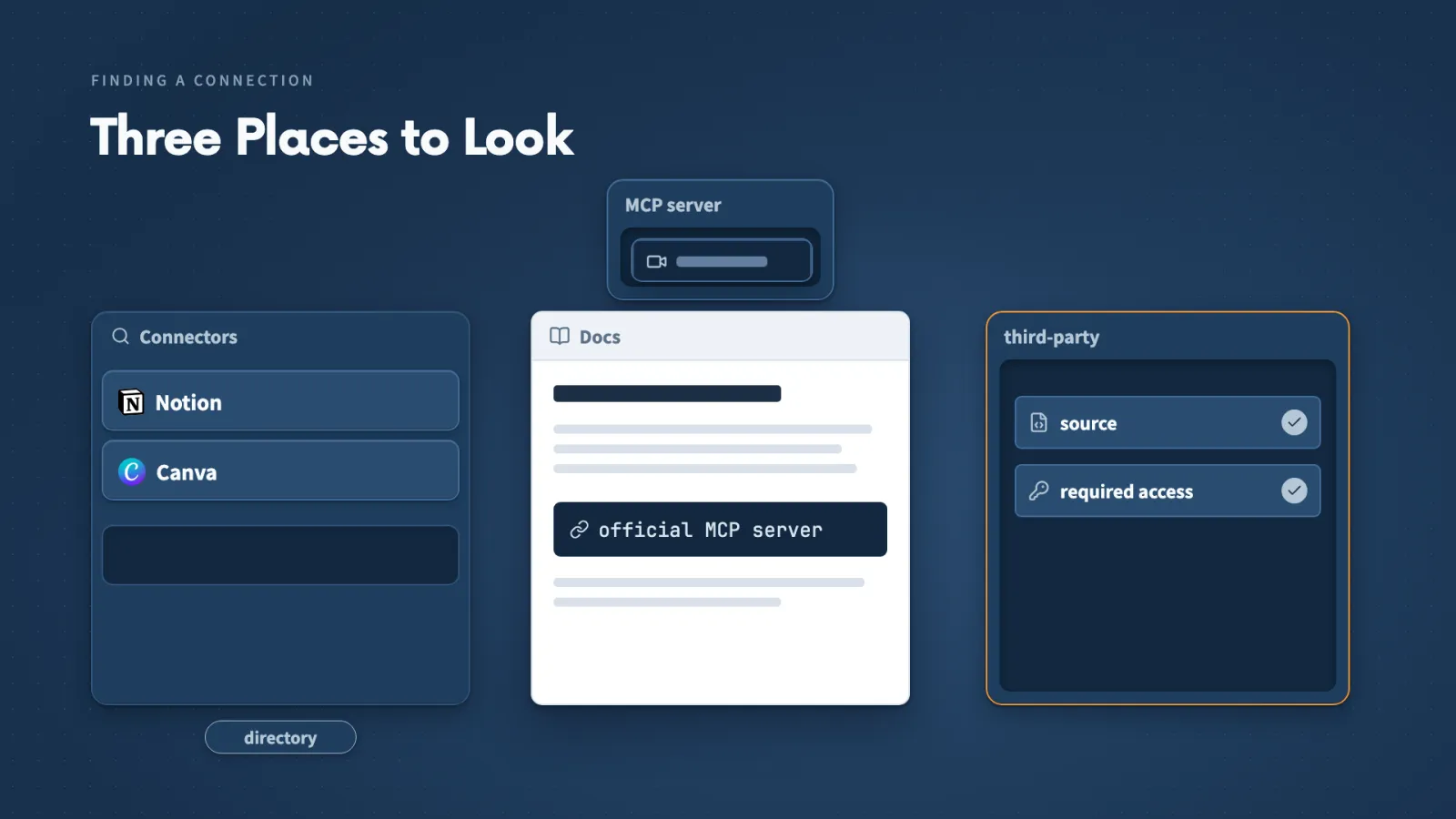
Choosing a connection is a matching job: list the actions your work needs, then check each connection for them.
Key ideas
- 01Connector directory: The first place I look. I check the publisher, the supported actions and the Claude Code setup instructions.
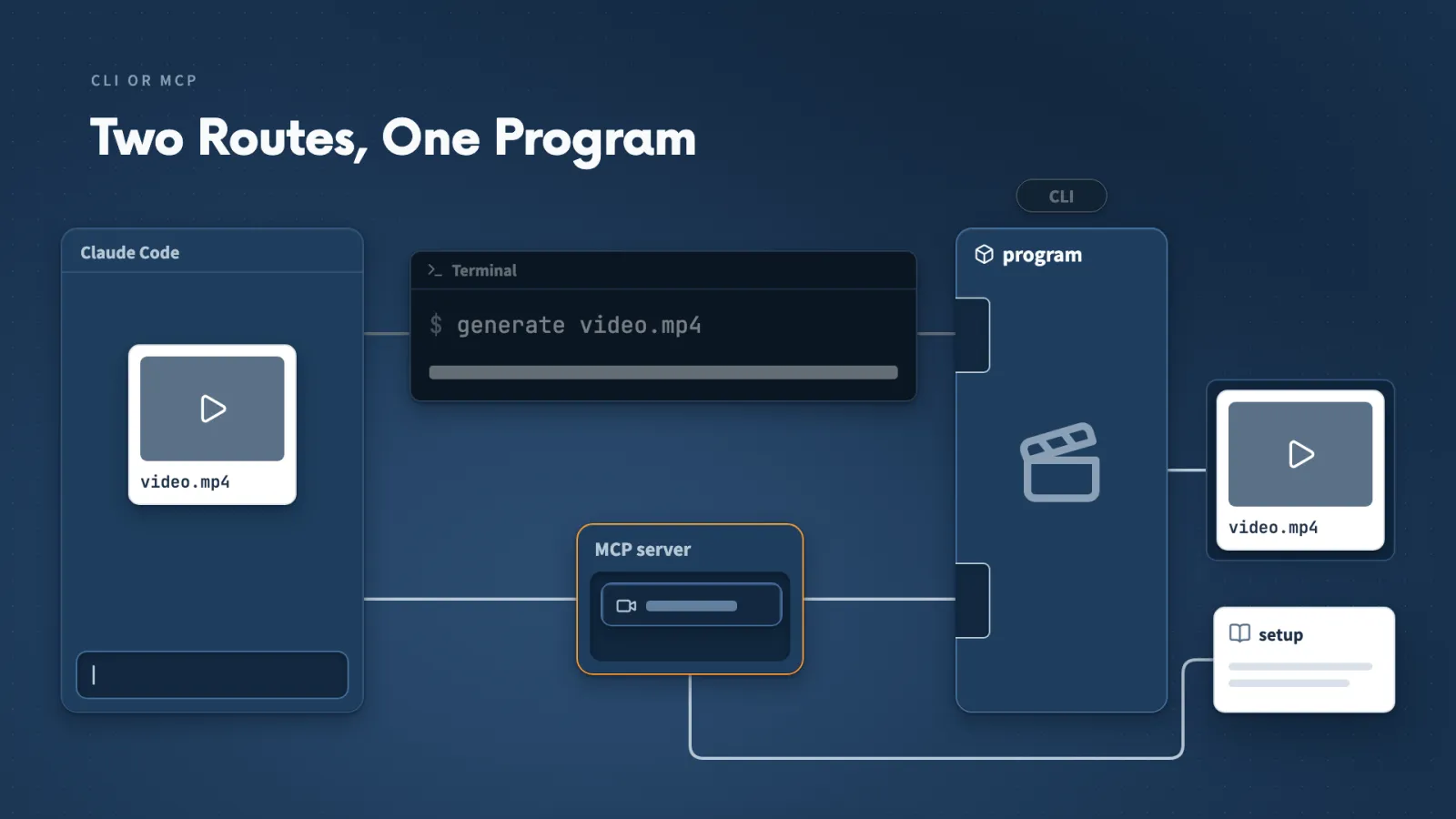
- 02CLI: A program driven by typed commands. Claude Code runs it in the terminal, waits and inspects the result.
- 03MCP or CLI: I take the supported route that does the job and fits my setup. When an app offers both, its current instructions decide.
- 04Tool Search: Claude finds the tools a request needs and loads their definitions then, not all of them at the start.
For the feedback job I need three actions:
- Read a Notion page.
- Save a report there.
- Create editable designs in Canva.
I check every connection for those. A provider can publish an official MCP server in its own documentation without appearing in the directory. For a third-party connection, I check its source and required access first.
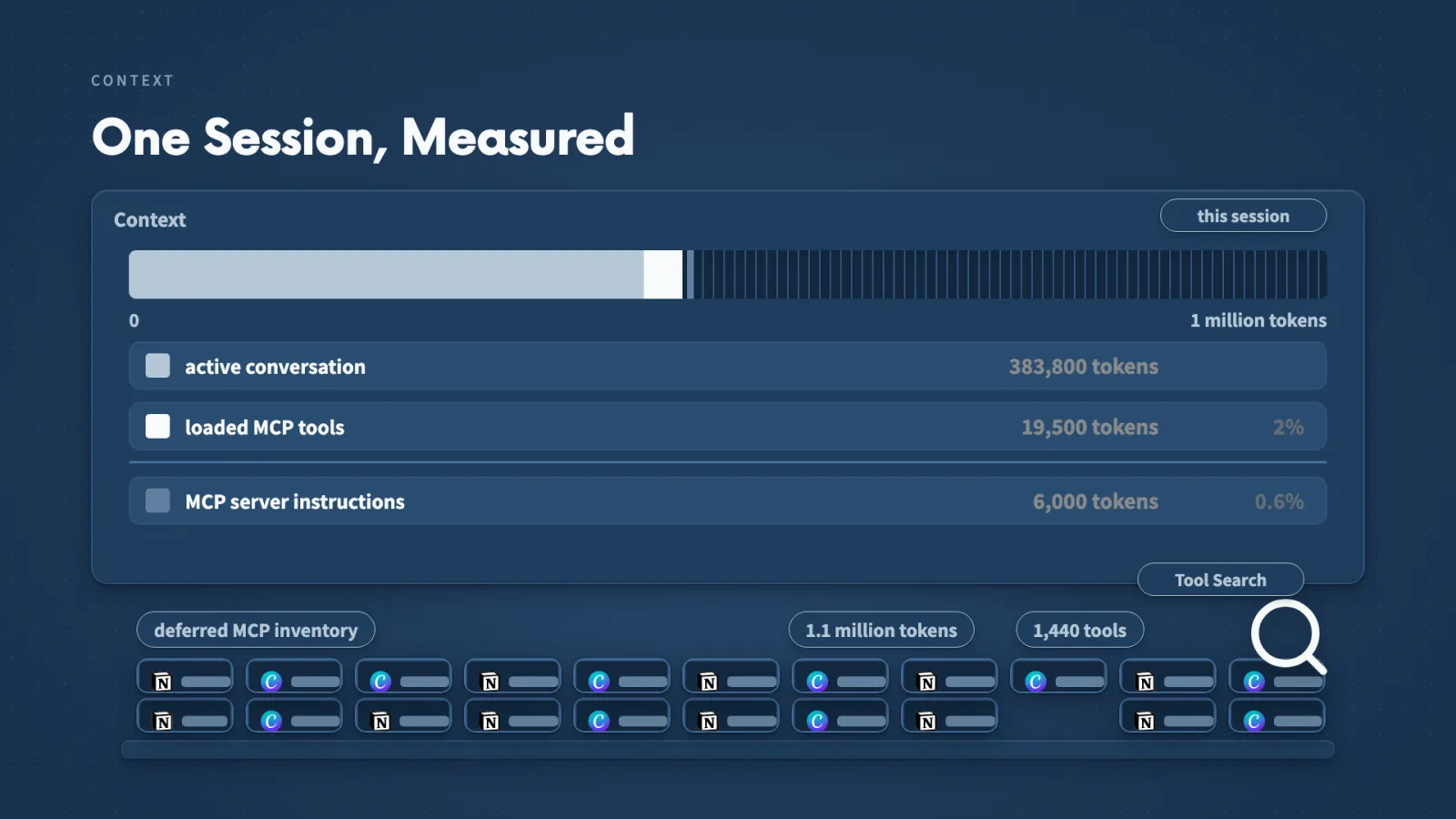
My context panel showed where the space goes in one session:
- Window: one million tokens, with about 383,800 in the conversation.
- Loaded MCP tools: about 19,500 tokens, or 2 percent.
- Deferred tools: 1,440, not in the conversation at all.
Those numbers describe one session, and returned page contents and reports still take space when they arrive.
Make it yours
- Freelancer or consultant
- Your input
- A client's project notes in an app like Notion
- Ask Claude
- Find the connection for that app and read one page
- Check
- The action list includes reading and saving, and the page really comes back
- Small business owner
- Your input
- The booking or invoicing software I already run
- Ask Claude
- Find out how Claude can work with it
- Check
- One supported route that does my job and fits my setup
- On a team at work
- Your input
- The tool my team keeps notes or tickets in
- Ask Claude
- Which route do its current instructions recommend for Claude Code?
- Check
- What the first request returned
Lecture 9.5
How Do You Give Claude Access to Notion?
When Claude cannot read a page, the fix is almost always in the connection or the account, not in your Skill. Four checks tell you where to look.
Key ideas
- 01Connectors: In the desktop app I browse connectors, search Notion, choose Connect to Claude, sign in and approve workspace access.
- 02Turn it on: A connected service also has to be switched on in this conversation's connector list.
- 03Name the page: I give the exact page address so Claude knows which page I mean. A name works when only one page matches.
- 04Ask for IDs: I ask for the page title and every ID back, so I can check what was retrieved.
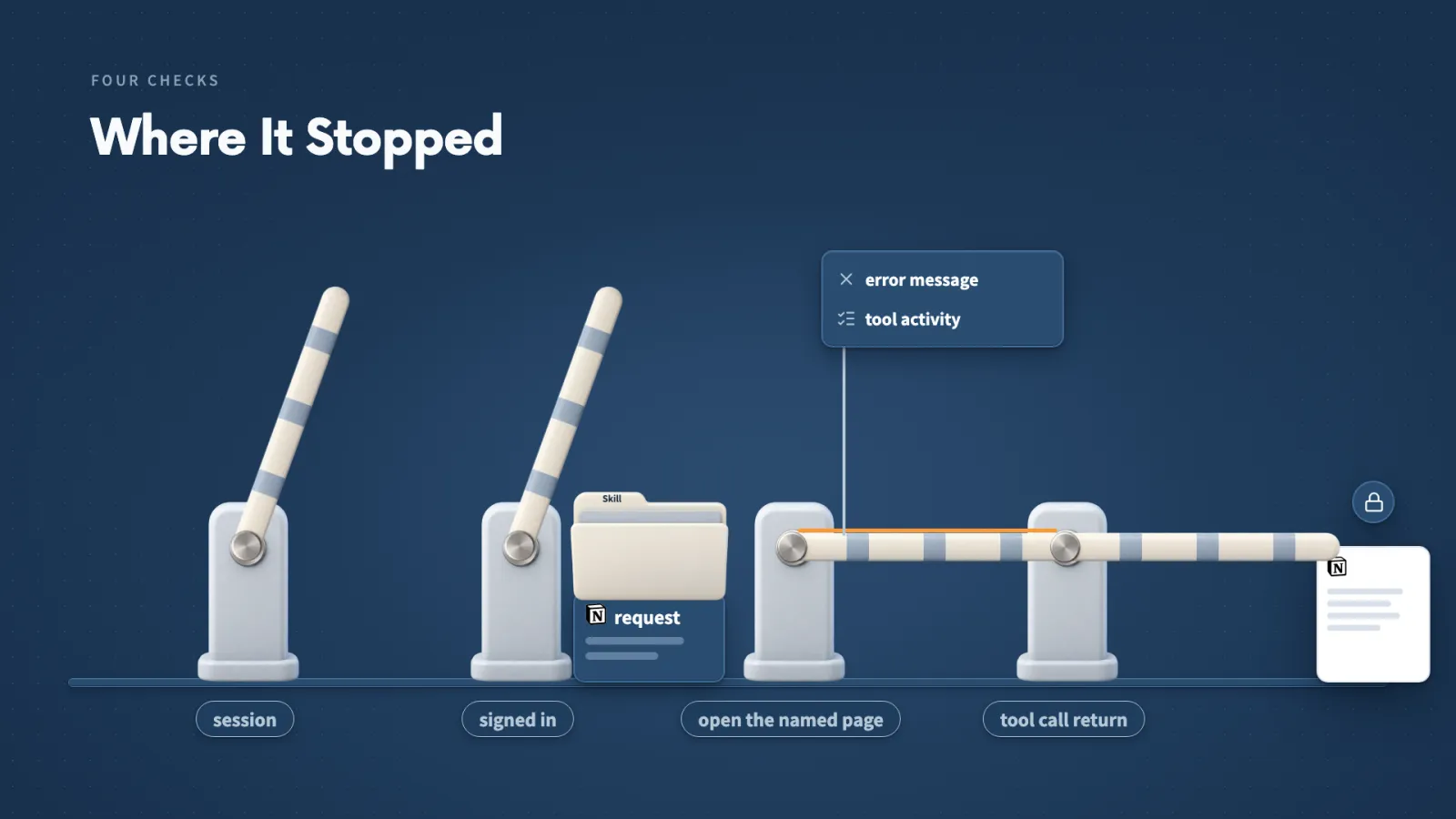
When a request fails, I check four things:
- Can this session use the connection?
- Did the right account sign in and authorize?
- Can that account open the page?
- Did the tool call return what I asked for?
If the account can't open the page, the connector won't give Claude access.
If the first attempt fails. Mine said Claude could not finish connecting. Once I was signed in to Notion, trying again worked.
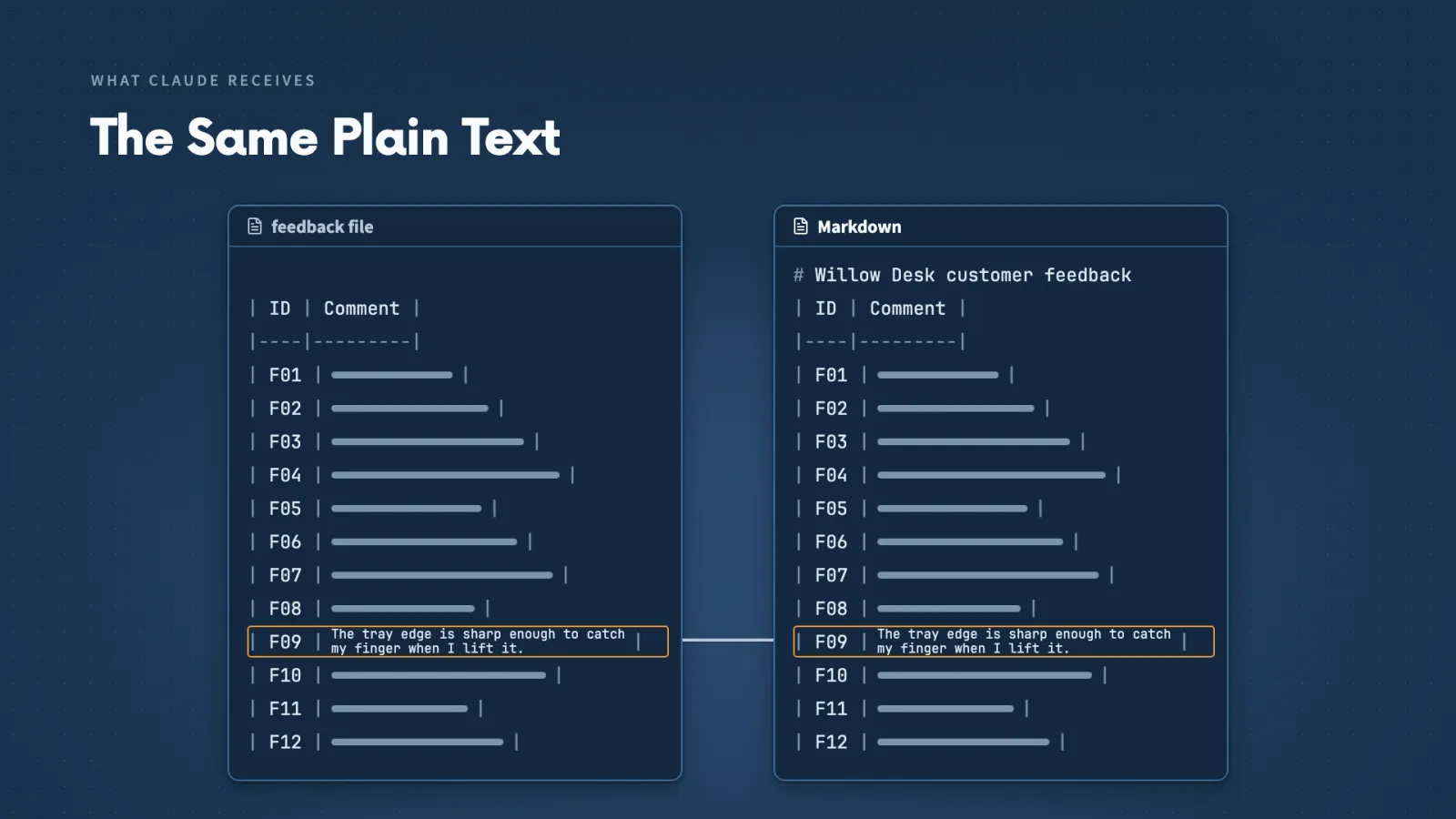
Name the exact page. I turned Notion on in the conversation and gave Claude the page address. It returned the page titled Willow Desk customer feedback with the 12 fictional records F01 through F12.
Make it yours
- Freelancer or consultant
- Your input
- A client's feedback page in Notion, shared with my account
- Ask Claude
- Read this exact page and list its title and every ID
- Check
- The returned IDs match the page
- Small business owner
- Your input
- The page where I keep customer comments or reviews
- Ask Claude
- Read it and list the title and every comment ID
- Check
- The count and IDs match what I see when I open the page myself
- On a team at work
- Your input
- A shared page such as meeting notes or a request log
- Ask Claude
- Read it, and if that fails, run the four checks
- Check
- Whether my own signed-in account can open the page
Lecture 9.6
Can Your Skill Use Data From Other Apps?
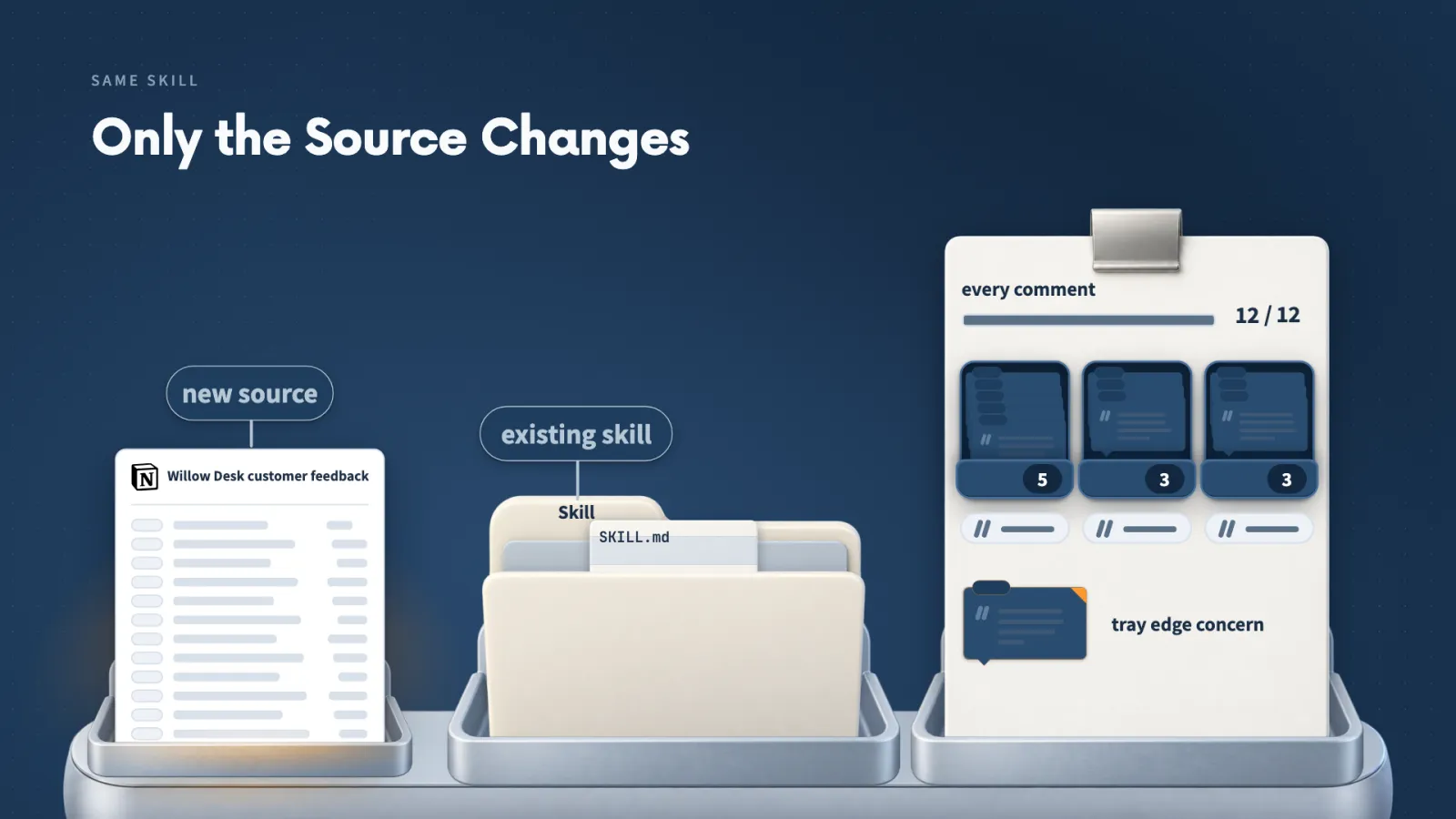
Your saved Skill is not tied to where its input came from. Point it at a page in another app and it still checks every comment.
Key ideas
- 01Same method, new source: The connection supplies the comments and the Skill supplies the analysis.
- 02Coverage: 12 comments in, F01 through F12, and every theme shows its IDs and quotations.
- 03The rare comment: F09 says the tray edge catches a finger. That is one possible problem to investigate, not a confirmed defect.
- 04Where the report goes: The source page, a new page or a subpage. I chose a subpage so the comments and the analysis stay together.
After Claude ran the Skill on the Notion comments, I checked three things:
- Coverage against the page Claude retrieved.
- The theme table, comparing each group with the original comments.
- Whether F09 stayed visible.
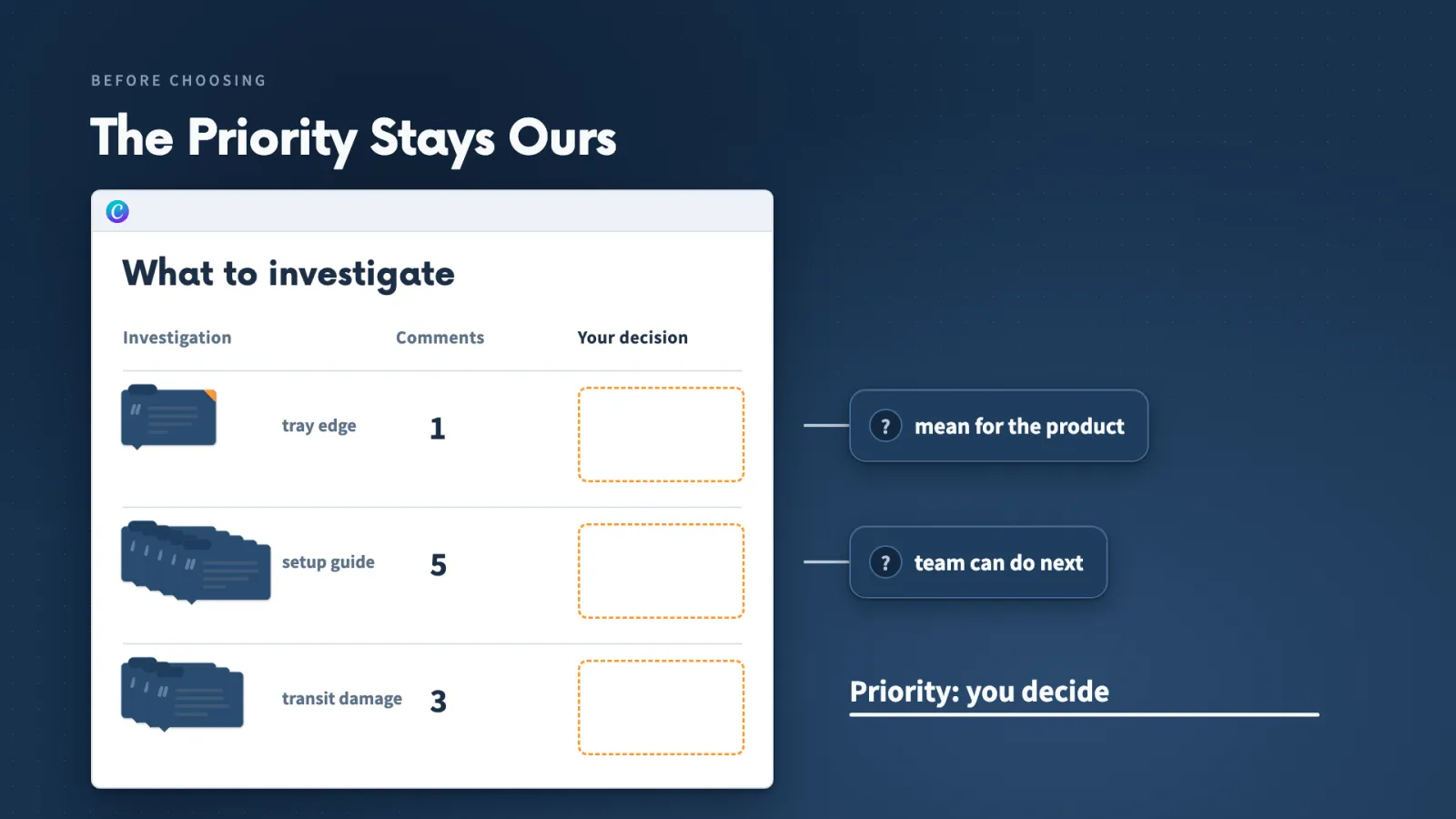
The report keeps F09 visible even though setup and packaging complaints appear more often. It proposes actions, and what Willow Desk investigates first is still my choice.
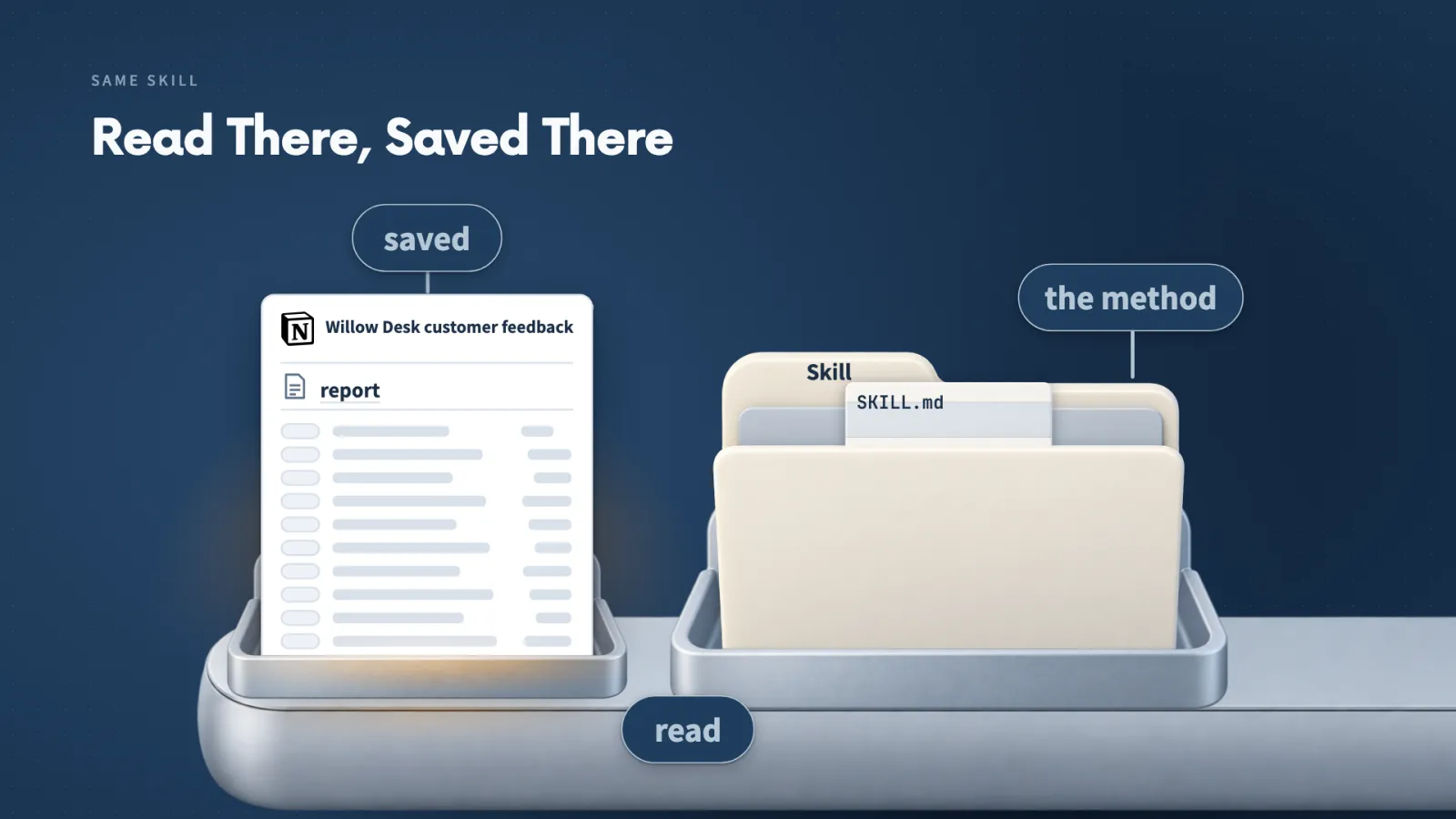
Where the report goes. I asked Claude to save it as a subpage beneath the feedback page, and its reply included a link.
Other sources. If your feedback lives in Google Sheets or Excel, a supported connection may retrieve a table the Skill can analyze. Keep the original comments and IDs in that source so you can check the report.
Make it yours
- Freelancer or consultant
- Your input
- A client's survey responses in Notion, each with an ID, and my saved analysis Skill
- Ask Claude
- Use this page as input and save the report as a subpage under it
- Check
- The coverage count matches the page, and every theme shows IDs and quotations
- Small business owner
- Your input
- My customer comments, kept with IDs, and the analysis Skill I built
- Ask Claude
- Run the Skill on the page you retrieved
- Check
- A rare but worrying comment is still visible, and I decide what to investigate first
- On a team at work
- Your input
- Feedback or ticket notes in Notion, or a table from a supported spreadsheet connection
- Ask Claude
- Run our saved Skill and put the report beneath the source page
- Check
- Each group against the original comments, before the team acts
Lecture 9.7
How Can Claude Reuse a Tutorial?
You can let Claude inspect tutorials you trust and save the method as a Skill, as long as you check what it examined and what it produced.
Key ideas
- 01Watch: A GitHub project that prepares video captions and selected frames, so Claude sees the explanation and the examples on screen.
- 02Marketplace: A catalogue of packages Claude Code can install. I add one from a repository address, sync it, then add the plugin.
- 03My Watch choices: Local, so the work stays on my computer. Efficient, a smaller selection of frames. None for extra transcription, because both tutorials have captions.
- 04Sources reference: The note inside the saved Skill that names both tutorials and says how much of each Claude examined.
To turn two tutorials into a Skill, I did four things:
- Installed Watch, which prepares captions and selected frames.
- Picked Phil Waknell's presentation talk and a Canva presentation tutorial.
- Asked Watch to inspect them and Skill Creator to save the lessons as Canva Presentation Designer.
- Chose Local, Efficient and None for extra transcription when Watch asked.
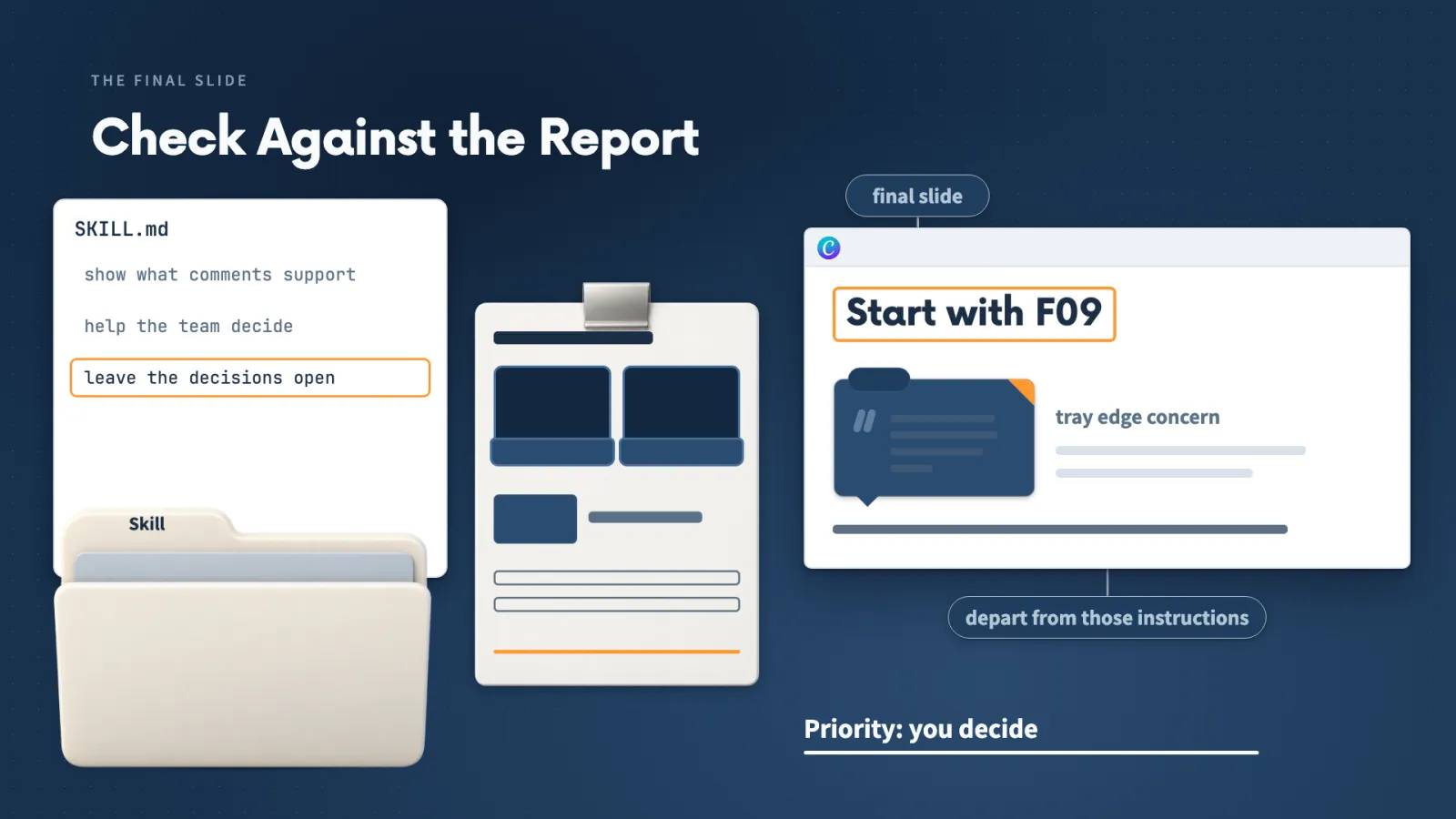
Check the result. Claude proposed an outline and asked about a brand kit, and I approved the outline and skipped the kit. It pointed out that the revised final slide says to start with the F09 check.
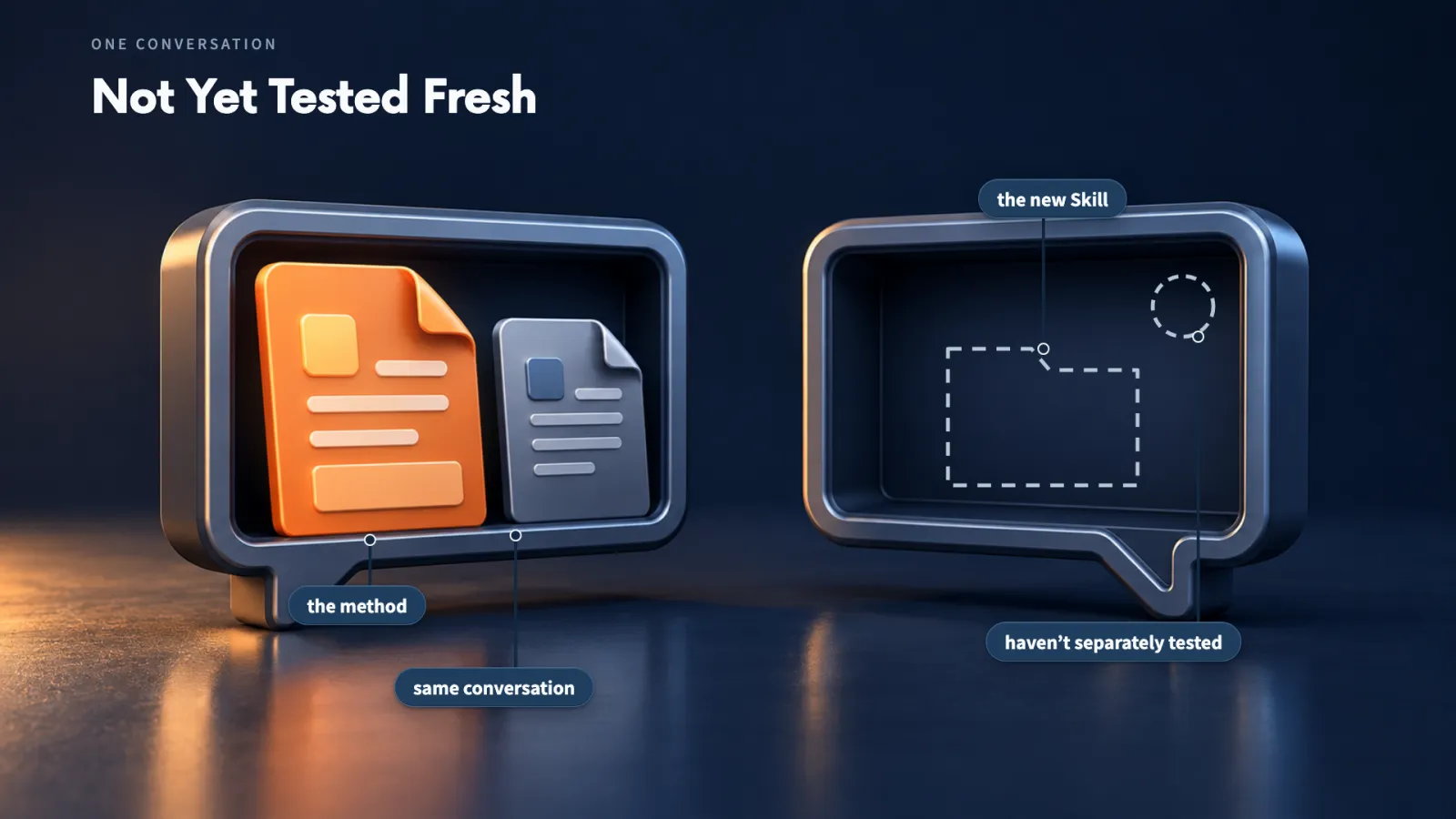
That priority is my decision, so a generated design can still depart from the Skill, and I compare it with the report.
Make it yours
- Freelancer or consultant
- Your input
- Two tutorials I trust, such as a proposal talk and a Canva tutorial
- Ask Claude
- Inspect them with Watch and save the method as a Skill
- Check
- The sources reference, to see how much of each video Claude examined
- Small business owner
- Your input
- A tutorial on the kind of post or flyer I make
- Ask Claude
- Inspect it, save the method as a Skill, then use it on my material
- Check
- The finished design against my own notes, before I rely on the method
- On a team at work
- Your input
- A recorded talk on presenting, a design tutorial and the report we need to discuss
- Ask Claude
- Make a presentation with the saved Skill
- Check
- Any recommendation the slides make, because choosing the priority stays with us
Lecture 9.8
How Can Claude Use a Saved Design Method?
You can ask for a deck and a brief by who will use them, and leave the page sizes and layouts to Claude.
Key ideas
- 01Plan first: Claude considers what the team should know, believe, feel and do after seeing the feedback, then proposes the slides and a portrait brief.
- 02Revise at the plan: If the decisions are already made, I say so. If the brief goes out by email, I ask for it in that form.
- 03Two formats: A short decision deck for the discussion and a one-page action brief to refer to afterwards.
- 04Edit in Canva: Opens the design in Canva's editor, after Canva asks me to sign in.
Claude showed its plan before it built anything, and the plan is where I can steer:
- If the decisions are already made, I say so.
- If the brief goes out by email, I ask for it in that form.
- Otherwise I approve the plan, as I did, and skip the brand kit.
From that plan Claude made a 5-slide deck and a one-page brief in the same conversation. The deck's final slide leaves the order of the proposed actions for me to choose.
Edit in Canva. For the brief I chose Edit in Canva, signed in when Canva asked, and selected its table and text. The proposed investigations sit beside the supporting feedback IDs and quotations, with space for my decision.
Before choosing how many slides or pages to make, think about who will use them and what you want to help that person do.
Make it yours
- Freelancer or consultant
- Your input
- A client's findings in Notion and a Canva Skill I saved earlier
- Ask Claude
- A short decision deck and a one-page brief, with the plan shown first
- Check
- The brief opened in the Canva editor, where I make my own changes
- Small business owner
- Your input
- Notes for a month of social posts, in Notion or a spreadsheet
- Ask Claude
- Retrieve them, apply my saved method and prepare the designs in Canva
- Check
- The designs, which I revise in the same conversation
- On a team at work
- Your input
- A report we already discussed, plus the decisions made
- Ask Claude
- Tell Claude the decisions are settled, and ask for a deck to explain them and a brief to keep
- Check
- The deck and brief against the report, with open choices left to the team
Lecture 9.9
Connect an MCP That Is Not in the Directory
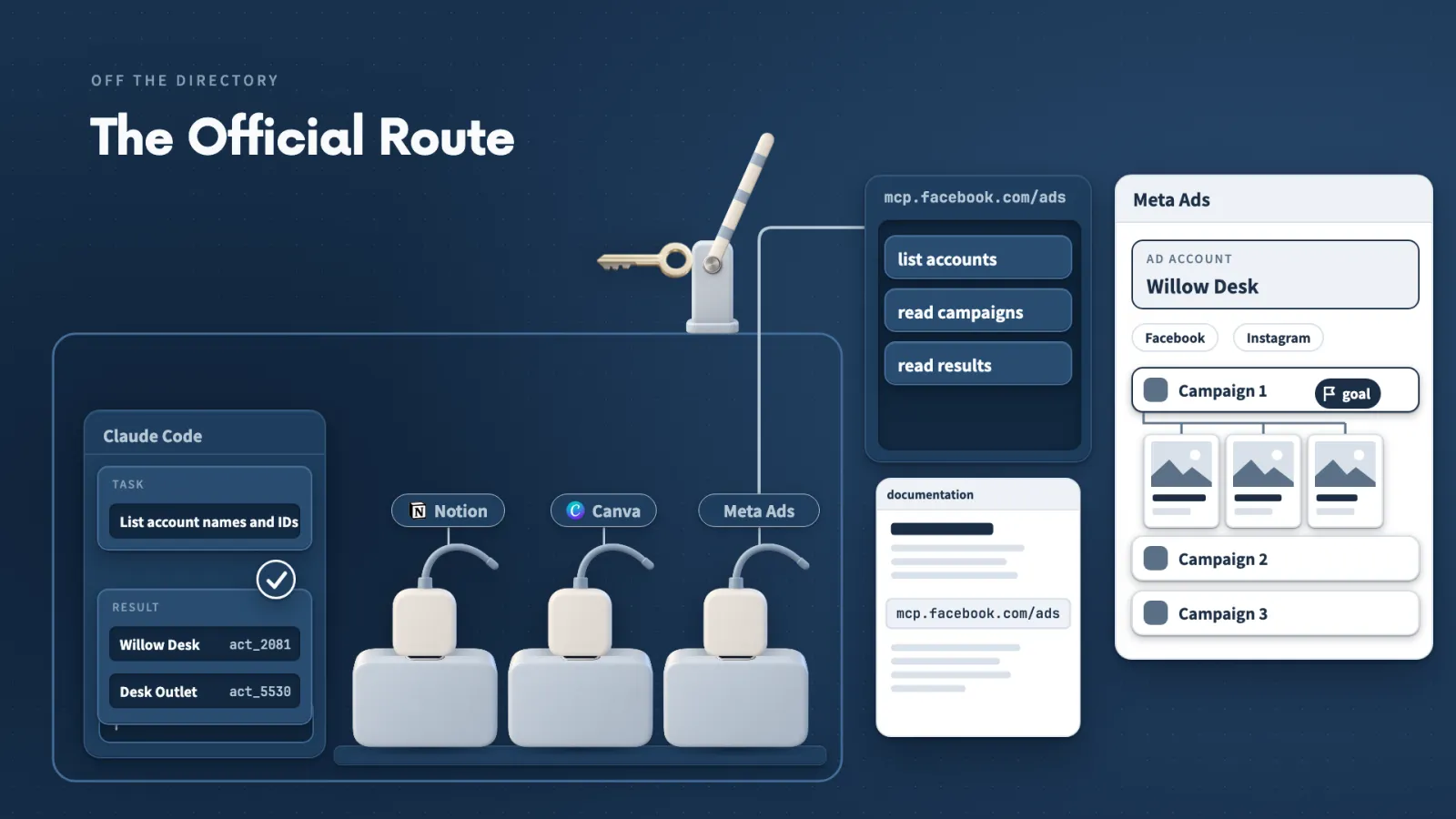
An app can have an official MCP server even when it is missing from the directory, and the provider's own documentation is where you find it.
Key ideas
- 01Official, not listed: When the directory has no listing, I check the provider's own documentation.
- 02Desktop custom connector: Connectors, Manage connectors, Add custom connector. I name it, paste the address, and it appears under Yours.
- 03Terminal setup: I ask Claude to add the server without logging in. It becomes a local MCP for the project, and I authenticate myself.
- 04/mcp: Claude Code's list of MCP servers, with whether each needs authentication and how many tools it has.
Check the docs first. For Meta Ads, the connectors and plugins showed no listing from Meta, so I asked Claude to find the official documentation. The Ads MCP Server page gave the address, mcp.facebook.com/ads.
That one address works two ways:
- Desktop app: add a custom connector, sign in, and approve the Facebook reconnect step myself. It shows Connected with a checkmark.
- Terminal: after removing that connector, I asked Claude to configure the server without logging in. It adds a local MCP for the project, and I authenticate with /mcp.
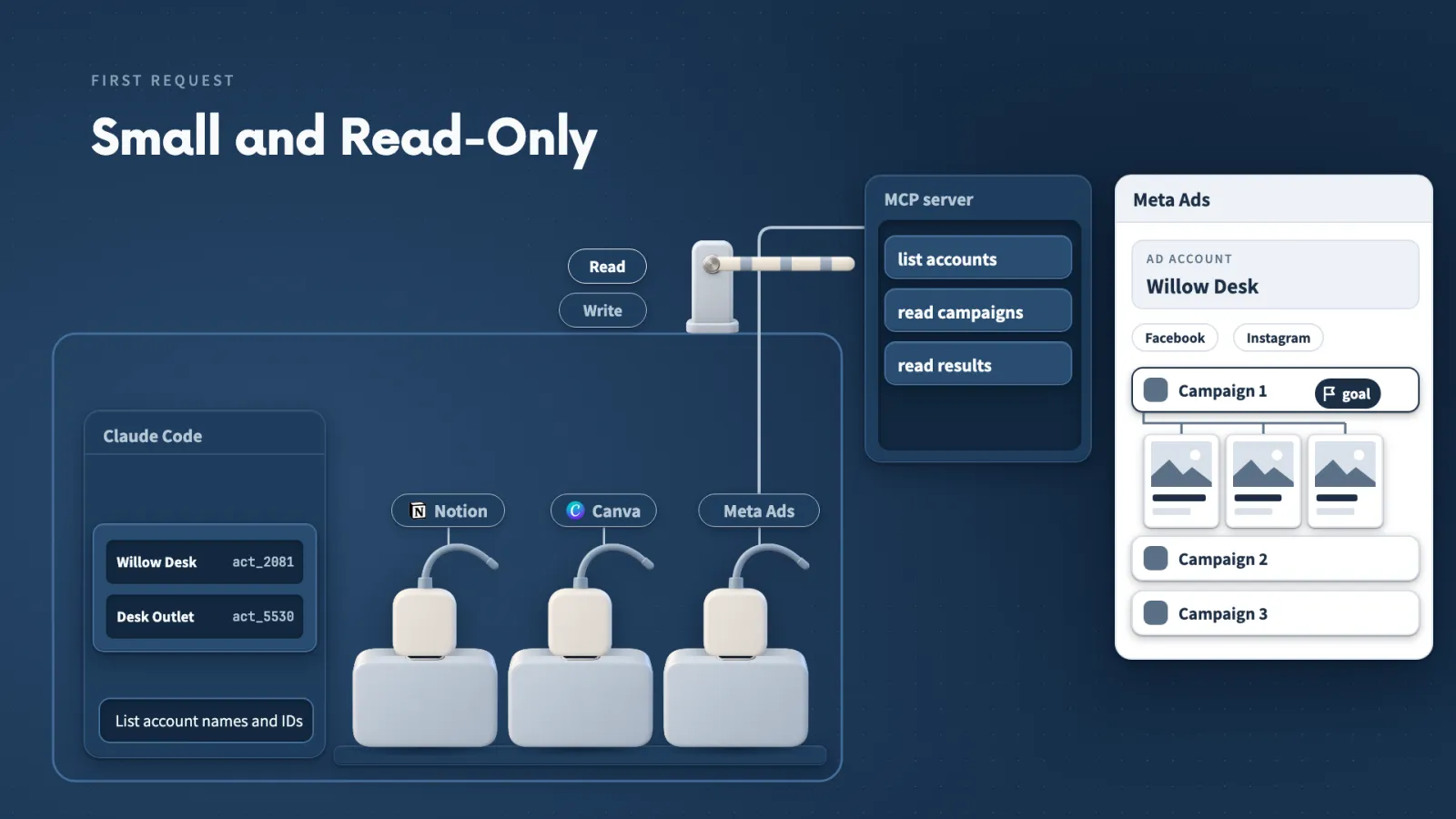
The terminal route does not show under Yours in the desktop app. In /mcp the row turned green with 97 tools, and Claude had made no tool calls yet.
Make it yours
- Freelancer or consultant
- Your input
- A client's advertising account and the provider's documentation page
- Ask Claude
- Connect the official route, sign in myself, and ask whether Claude can access the MCP
- Check
- Connected and a loaded tool list, before any client data is touched
- Small business owner
- Your input
- My own business's advertising account
- Ask Claude
- List the account names and IDs you can access
- Check
- The list matches the accounts I can open myself
- On a team at work
- Your input
- The server address from the provider's documentation
- Ask Claude
- Add it as a desktop connector, or have Claude add it from the terminal while I authenticate
- Check
- The row in /mcp, showing the connection and its tool count
Lecture 9.10
Workflows You Can Run With Connected Apps
Every workflow here has the same three parts, so you can describe your own the same way: starting material, connected actions and a result you can inspect.
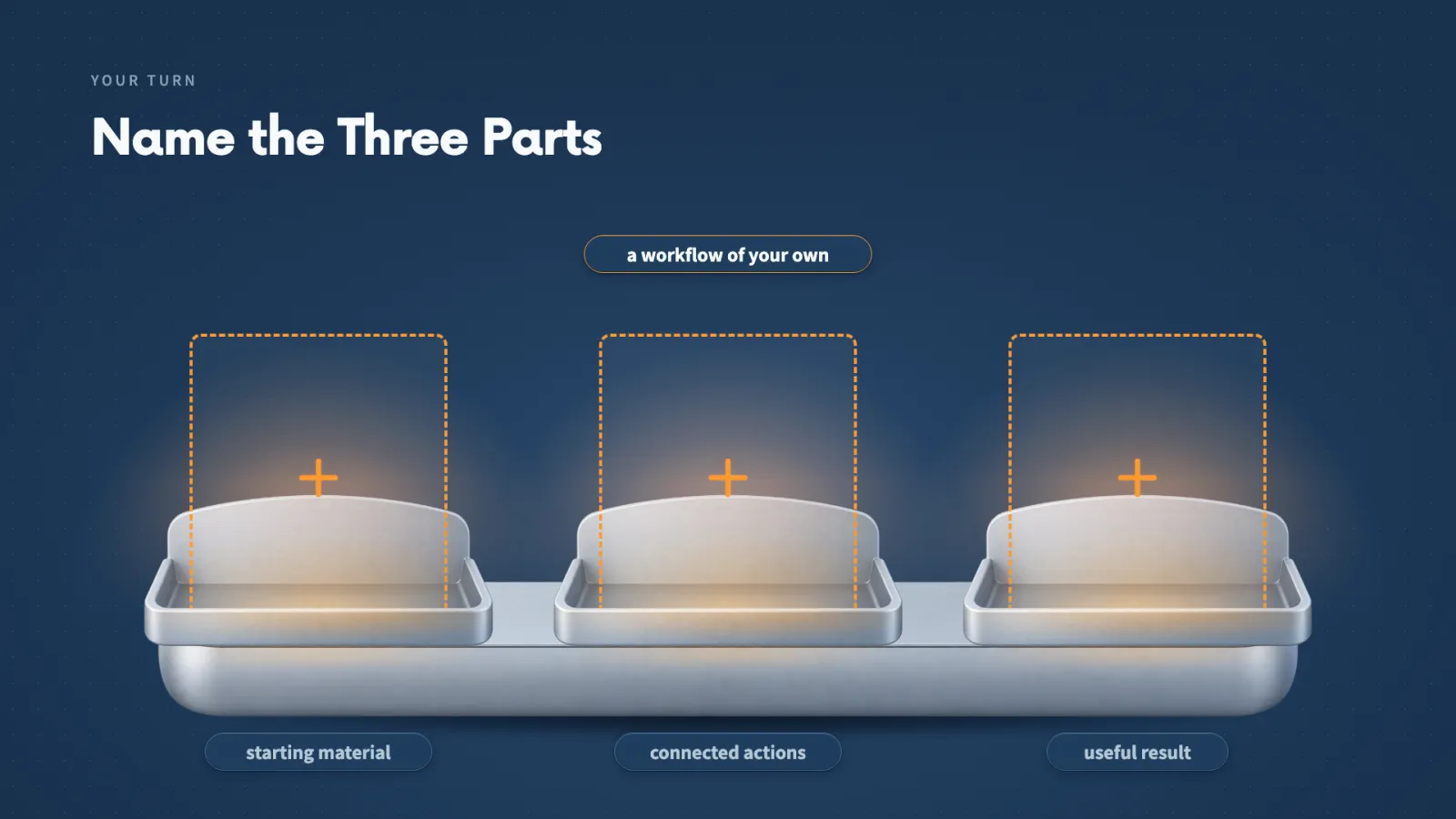
Key ideas
- 01Creative: Duncan Rogoff starts from one product photo, a brand brief and shared visual references, so the images and video concepts look like they belong together.
- 02Advertising: Felipe Vergara gives account details and a strategy first. Missing identifiers had to be supplied, and some targeting still needed manual adjustment in Ads Manager.
- 03Browser: Elie Steinbock has Claude move through a new onboarding flow in his app and look for problems.
- 04Slack and docs: Read a named thread, list decisions and open questions, draft tasks. Context7 retrieves library documentation for a build.
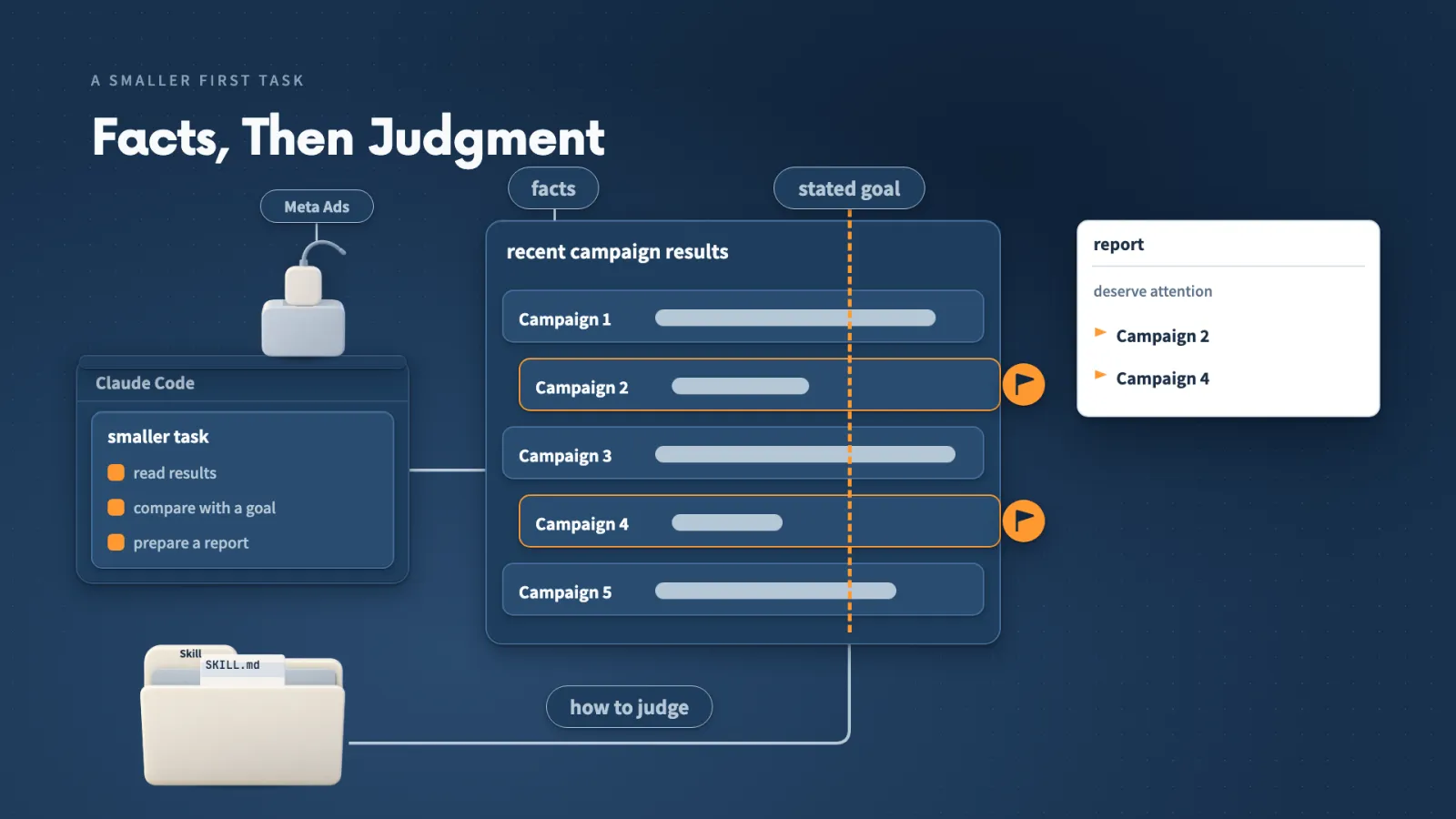
For your own ad account, I suggest a smaller first task. Have Claude:
- Read recent campaign results.
- Compare them with a stated goal.
- Prepare a report on which campaigns deserve attention.
The account data supplies the facts, and your Skill explains how to judge them.
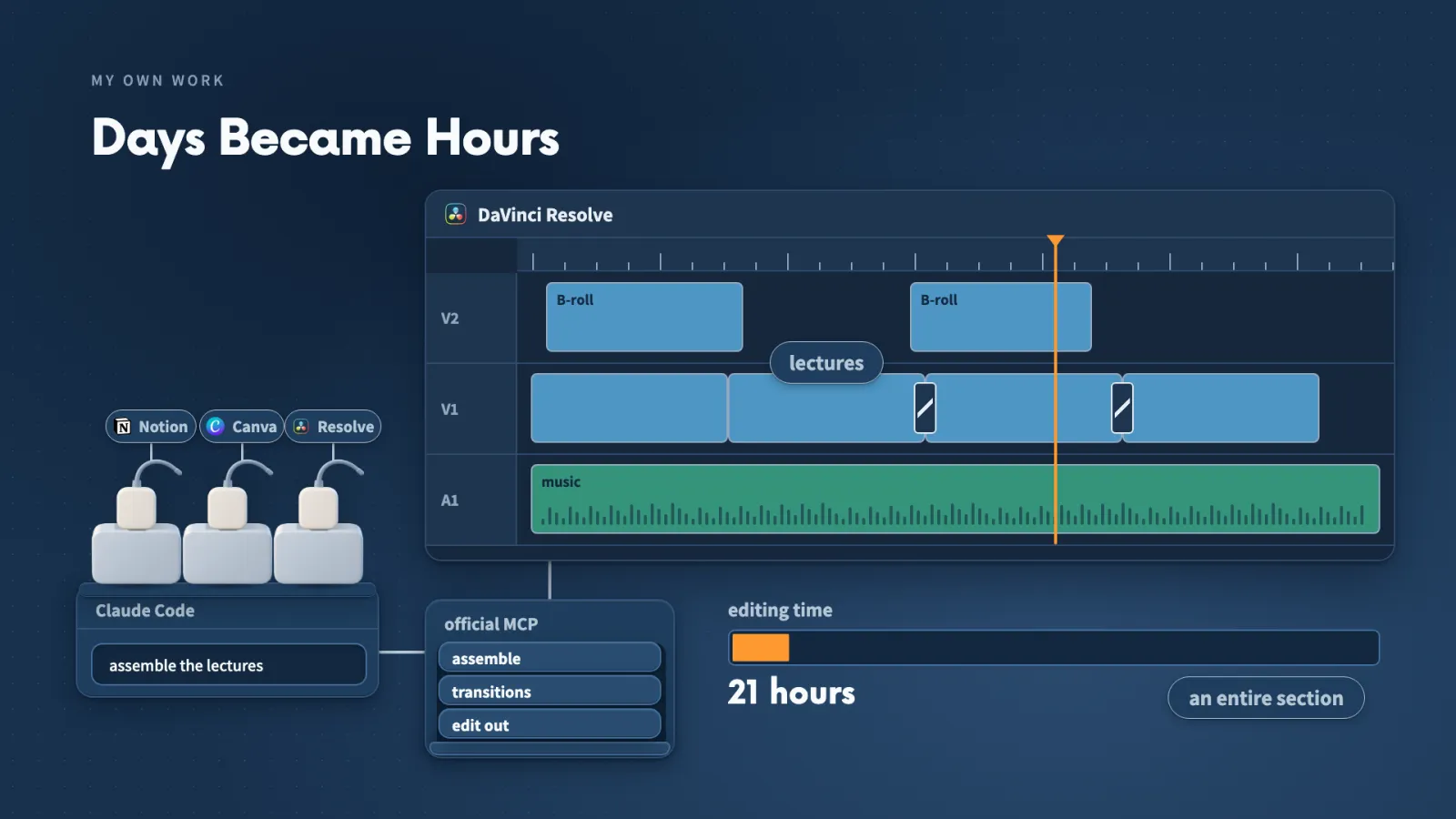
My own case is video. We used Resolve to assemble this section's lectures, apply transitions and background music, and edit out mistakes.
Blackmagic's official MCP gives Claude supported actions in Resolve, so I direct from Claude Code and inspect the timeline afterwards. My editing time for a whole section went from 10 days to 21 hours.
Lecture 9.11
Which Workflow Will You Connect?
The pattern is complete, so the next step is yours: pick one job you already do and connect it.
Key ideas
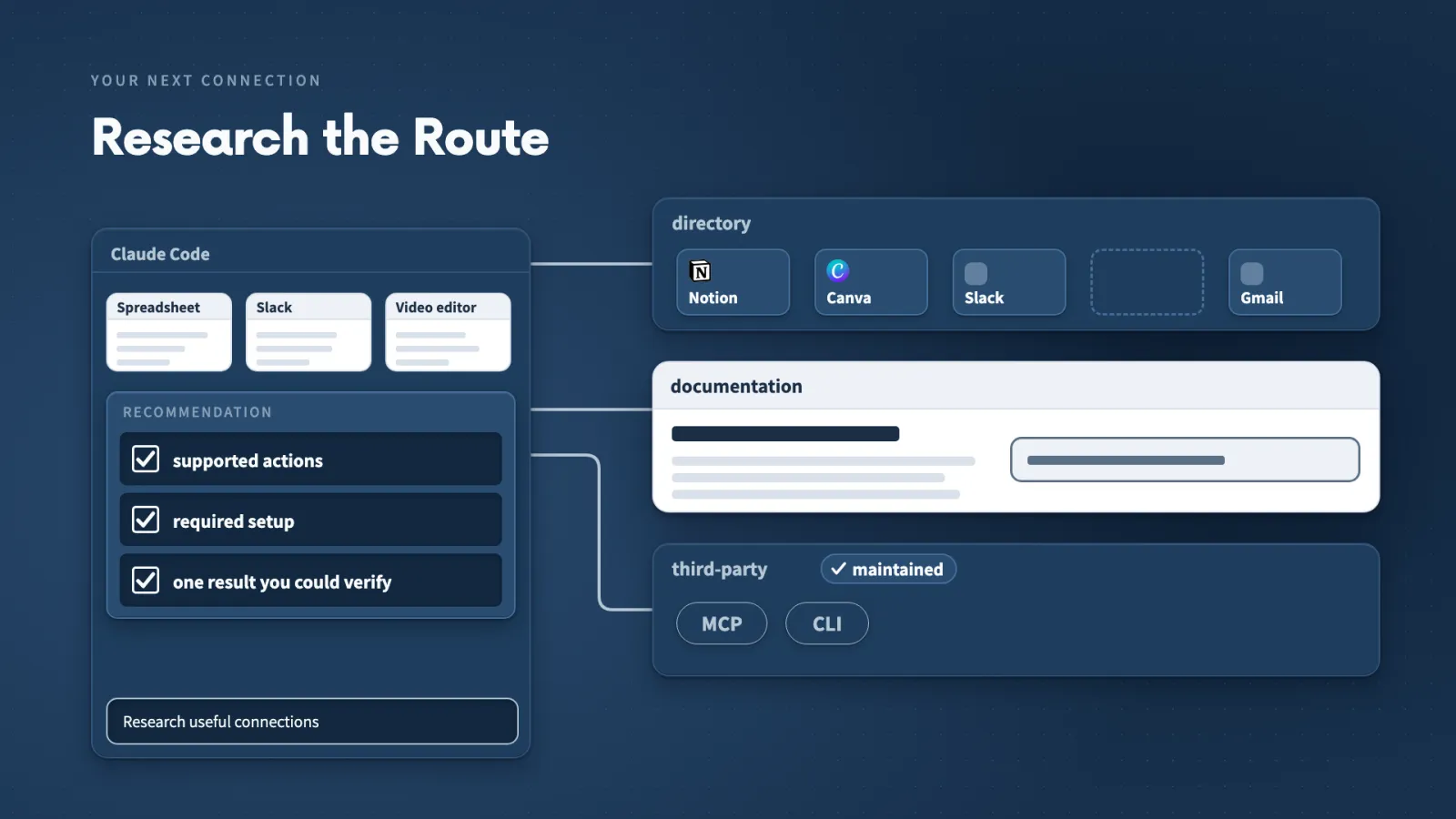
- 01Describe your job: Where the information starts and what you want at the end.
- 02Ask Claude to research: Ask for the supported actions, the required setup and one result you could verify.
- 03Start small: One connected action, opened in the destination app and compared with your request.
- 04Agent: Takes responsibility for one part of a larger job and returns its findings to the main conversation.
To choose your first workflow, I would:
- Pick a job I already do. The source might be a spreadsheet, the discussion might be in Slack, or the result might belong in a video editor.
- Ask Claude Code to research useful connections for that workflow.
- Take the recommendation that helps, and leave the others for later.
When the job grows, it may include researching the source, analyzing the findings and preparing the final material. An AI agent can take responsibility for one of those parts and return its findings to the main conversation.
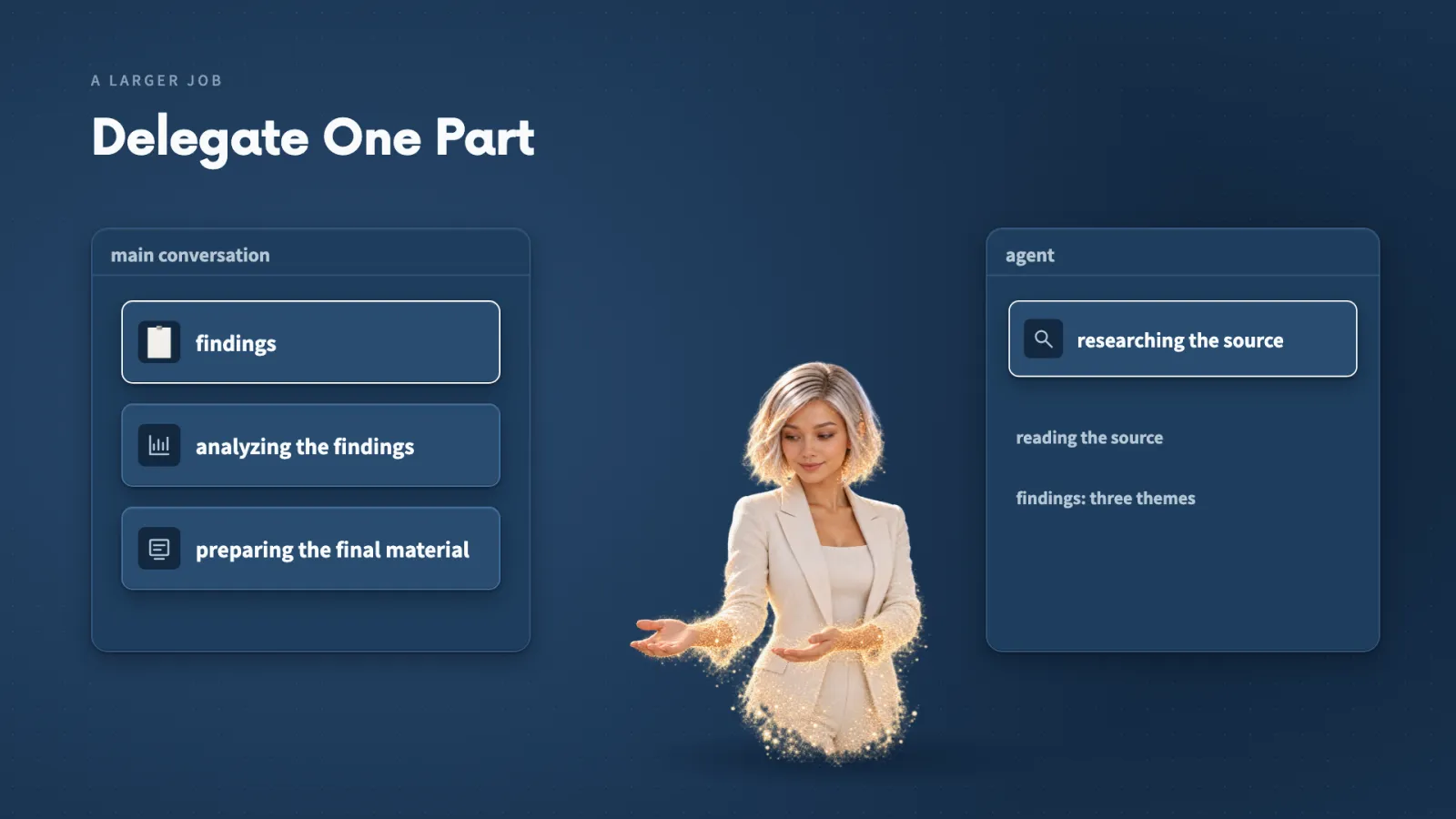
Directing a larger job then means deciding three things:
- which part an agent owns
- what information it needs
- what result should come back
Quick reference
Connecting
| Desktop connector (Notion) | Connectors, Browse connectors, search Notion, Connect to Claude, sign in, approve workspace access. Then turn it on in the conversation's connector list. |
|---|---|
| Retry after a failed attempt | My first Notion attempt said Claude could not finish connecting. After signing in to Notion, the second attempt worked. |
| Custom connector (not in the directory) | Connectors, Manage connectors, Add custom connector. Name it, enter the provider's server address, choose Sign in when needed, leave automatic registration selected. |
| Meta Ads server address | mcp.facebook.com/ads, from Meta's developer documentation page for the Ads MCP Server. |
| Plugin marketplace (Watch) | Browse plugins, add a marketplace from the repository address, sync it, then Add the plugin. |
| Terminal MCP setup | Ask Claude to add the server and not log in. It adds a local MCP for the project and says authentication is still needed. |
| Authenticate a terminal MCP | In Claude Code enter /mcp, select the entry, choose Authenticate and continue in the browser. A green row with a tool count means connected (Meta Ads showed 97). |
Commands
| /mcp | Lists MCP servers, flags any that need authentication and shows tool counts. Connections imported from claude.ai appear in a separate group. |
|---|---|
| /watch:watch | Use it to run Watch on tutorial links you paste in. It asks Local or Gemini, a detail level, and what to use for videos without captions. |
Where things live
| Desktop custom connector | Under Yours in the connector settings, shown as a Web Custom connector. |
|---|---|
| Terminal-added MCP | In the project's local MCP list, a different place from the desktop connector list. It does not show under Yours. |
| Notion report | A subpage beneath the original feedback page, with a link in Claude's reply. |
| Canva Presentation Designer Skill | Created in the project, with a sources reference naming the tutorials and how much of each Claude examined. |
| Claude Ads repository | On GitHub, with skill folders for Amazon Ads, Google Ads and Meta Ads. |
Words used in this section
| Tool | An action Claude can call, such as reading a page or creating a design. |
|---|---|
| API | The interface one program uses to request supported operations from another app. |
| MCP | Model Context Protocol, a common format describing an app's actions, the inputs each needs and the result it returns. |
| MCP server | The program that offers those actions through MCP. It can run locally or with the provider. |
| Connector | How a ready-to-connect service appears in the desktop interface, including account sign-in. |
| Plugin / marketplace | A plugin is an installable package that can hold Skills, an MCP server or other helpers. A marketplace is a catalogue of packages. |
| CLI | A program driven by typed commands, which Claude Code can run through its terminal tools. |
| Tool Search | Claude finds relevant tools and loads their definitions when needed, not all at the start. |
| Browser MCP / Browser Use / computer use | Browser MCP is one particular browser connection. Browser Use is a separate project with its own MCP routes. Computer use is the broader ability to click, type and read the screen. |
Use X when / Y when
| Skill / tool | Skill for a method of analyzing or designing. Tool for an outside action, such as reading a page or creating a design. |
|---|---|
| Directory / official docs / third-party | Directory first, checking publisher, supported actions and Claude Code setup. Provider documentation when an official server is not listed. A maintained third-party connection as another route, after checking its source and required access. |
| MCP / CLI | MCP when the connection offers the action as a tool. CLI when a typed command does the job, such as generating a file. When both exist, follow the app's current instructions. |
| Local / remote MCP server | Whichever the provider's setup instructions name. |
| Exact page address / search by name | Address when you mean one page. Name when it is unambiguous, adding the title or address if similar pages cause confusion. |
| Desktop connector / terminal setup | Desktop for a manual route you do yourself. Terminal when you want Claude to configure it while you authenticate. |
| Watch Local / Gemini | Local to prepare captions and frames on your computer. Gemini to send the video to Gemini through an API key. |
| Watch Efficient / more detailed | Efficient for a smaller selection of frames. More detailed when the visual examples need closer inspection. |
| Watch None / WhisperX | None when the videos have captions. WhisperX to build a transcript from audio when they do not. |
When a request fails
| 1. Session | Can this session use the connection? |
|---|---|
| 2. Account | Has the intended account signed in and authorized access? |
| 3. Permission | Can that account open the named page or perform the action? Changing the Skill will not fix this. |
| 4. Result | Did the tool call return what you asked for? Check counts and quotations against the source. |
Numbers from the recordings
| Context window shown | One million tokens, with about 383,800 in the active conversation. |
|---|---|
| Loaded MCP tools | About 19,500 tokens, or 2 percent. Server instructions are a separate row, about 6,000 tokens, 0.6 percent. |
| Deferred MCP inventory | About 1.1 million tokens across 1,440 tools, available to find and not loaded into the conversation. |
| Willow Desk feedback | 12 fictional records, F01 through F12. F09 is the tray-edge concern. |
| Canva outputs | A 5-slide decision deck and a one-page action brief. |
| Resolve editing time | 10 days down to 21 hours for an entire section. |
More in this section
Files and links
- Section notes/resources/library/claude-code/notes-giving-the-brain-hands
- Complete resource pack/resources/library/claude-code/giving-the-brain-hands-complete-resource-pack
- Connected-app practice guide/resources/library/claude-code/connected-apps-starting-guide
- Meta connection practice guide/resources/library/claude-code/meta-connection-practice-guide
- Knowledge checks/resources/library/claude-code/connected-apps-knowledge-checks
- Workflow sources/resources/library/claude-code/connected-app-workflow-sources
- Feedback analysis Skill/resources/library/claude-code/customer-feedback-analyzer-skill
Keep building
More from Aruntastic
Practical courses for people who want to build useful things with AI.

AI SEO Course 2026: From Zero to Page-One Results
Research search demand, structure useful pages, and work through technical and off-page SEO.
Open the course →
AEO, GEO, AI SEO: Get Cited by ChatGPT, Google, Perplexity
Study how AI search finds information, and make your pages clear enough to be cited.
Open the course →
Microsoft PowerPoint Presentation 2026 for Professionals
Learn visual hierarchy, slide composition, typography and animation through practical work.
Open the course →
AI Agents for Leaders Who Have No Time to Learn AI
If you can delegate to a person, you can delegate to an AI agent. You keep the judgment. For managers and founders.
Open the course →
Introduction to Agentic AI and AI Agents
Learn how to direct an AI agent at work, with agentic workflows, RAG and MCP explained from a real first run.
Open the course →Toolkits and programme
Go deeper

Toolkit
SEO Accelerator Toolkit
150+ copy-paste AI prompts for audience research, keywords, content, technical SEO and link building.

Toolkit
GEO Accelerator Toolkit
100 detailed AI prompts for GEO audits, entity building, content structure and client reporting.

Programme
GEO Authority Accelerator
A complete GEO programme on our learner platform: nine modules and a 30, 60, 90 day roadmap. The GEO Accelerator Toolkit is included.
Claude certification practice
Preparing for a Claude certification?
Practice exams written by Arun: 600 questions across 4 mock exams and 2 drill banks. Unofficial preparation, not affiliated with Anthropic.
 CCAR-F
 CCAO-F
 CCDV-F
 CCAR-P
See Where You Stand
This resource is one piece of a much bigger system.
Try the free Claude Code Readiness Quiz alongside the course.
Take the Claude Code Readiness Quiz Free course readiness quiz