Claude Code Without Coding · Section 10
Notes: Agents and Subagents
The ideas worth keeping from Section 10, written to read instead of watch: what an agent receives, how it works and what you need back.
 Arun Nagarathanam · 12 Oct 2026 Notes · 72 of 80 in this course
Lecture 10.1
What Does a Subagent Do?
I can hand one part of a job to a separate agent and keep my main conversation on the decision I actually need to make.

Key ideas
- 01Main agent: My main conversation. It directs the work, writes the assignment and uses what comes back.
- 02Subagent: An agent working on the one part it received, in its own working conversation.
- 03Built-in agents: Claude Code already has some. Claude picks one from the job, or I name it.
- 04Saved agent: When the same responsibility keeps coming back, I save it with its own instructions.
Across this section we follow Willow Desk, a fictional business with supplied files. I will:
- question a plan with one agent
- save that agent so I can reuse it
- run 3 agents on 3 different files at once
- research a local product page before changing it
- adapt an agent someone else wrote
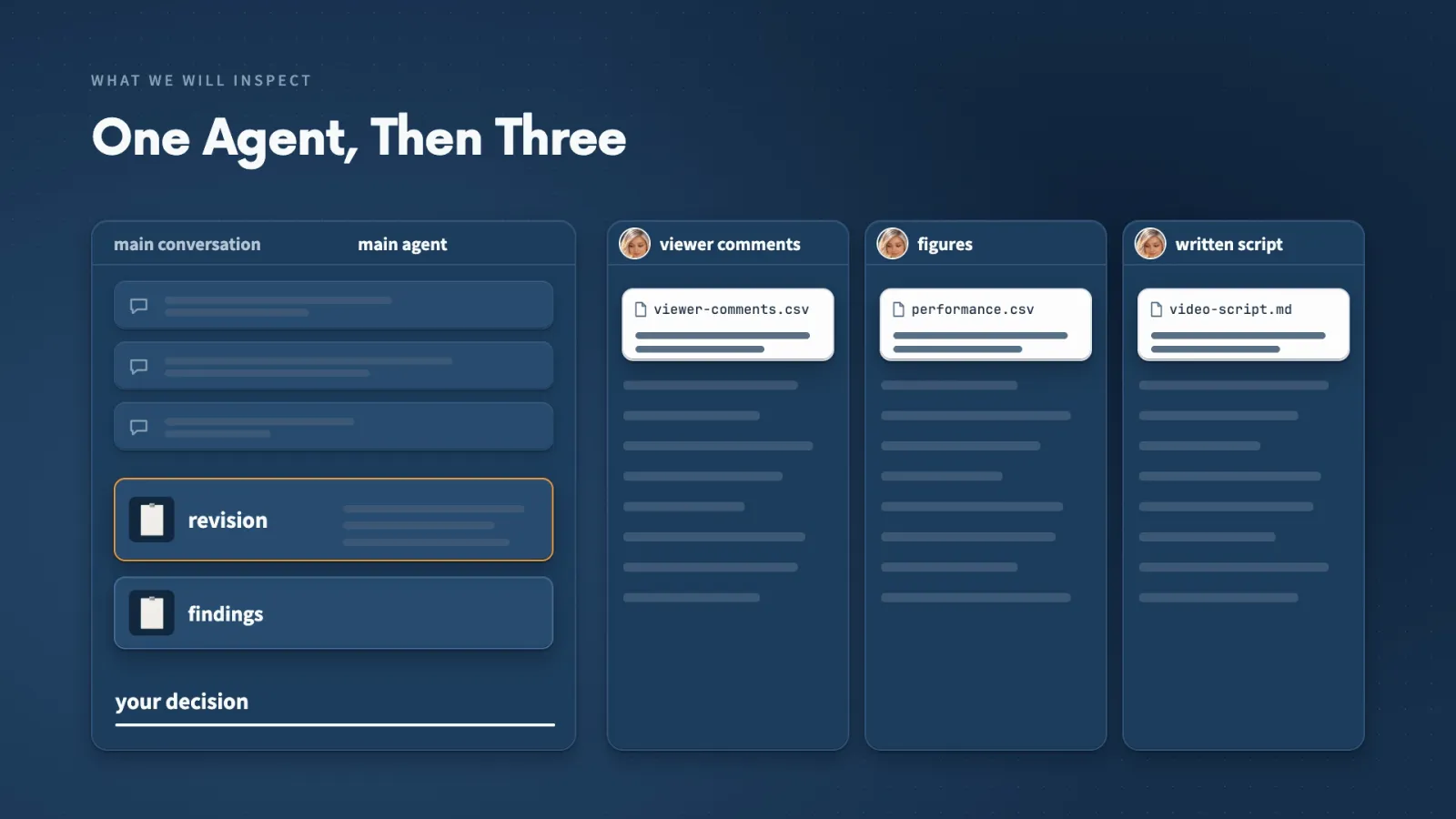
What stays with me. I decide what useful work to assign and how to judge what comes back.
Lecture 10.2
Give an Agent One Useful Job
A plan can sound sensible and still leave a question open. Giving an agent a perspective and one clear job is how I find that question before I commit.
Key ideas
- 01Perspective: I asked for a first-time customer's view, so the review focused on what a buyer needs to understand.
- 02One job: Examine the plan, connect concerns to the supplied comments and return questions.
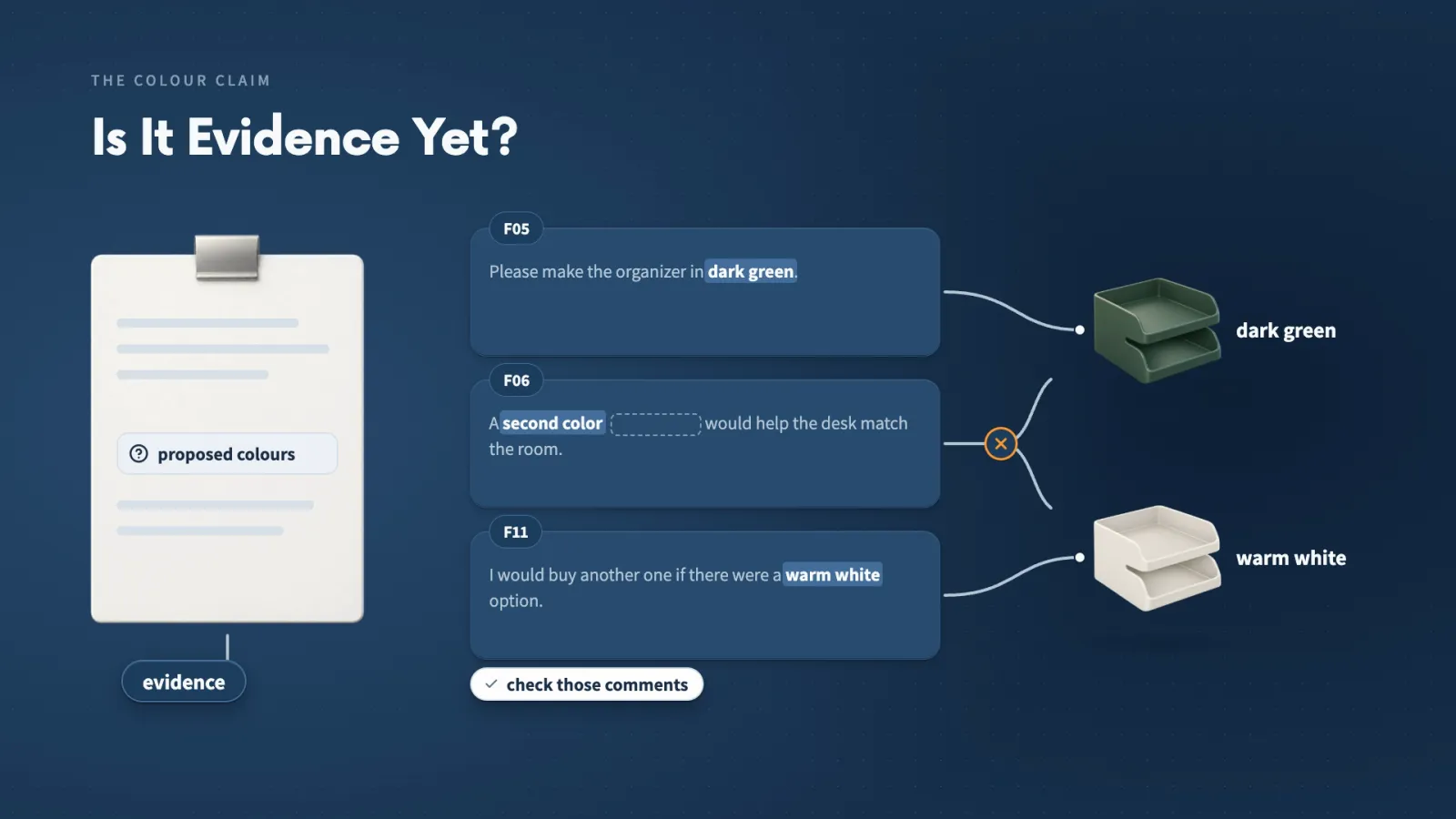
- 03Check the evidence: An agent can stretch a comment. I open the cited IDs before I believe a finding.
My request named 4 things:
- the 2 files: business-plan.md and customer-feedback.md
- the perspective: a first-time customer
- the return: up to 5 concerns, each with a next question
- the limits: leave the files unchanged and keep the decision with me
I also asked the main conversation to save the critique as initial-plan-critique.md and tell me which agent ran.
The useful finding. The plan reuses the existing setup guide, and several comments say that guide is hard to find or follow.
The stretched finding. The report counted 3 colour comments as support for the pilot. One of them asks for a second colour without naming it, so it supports neither proposed colour.
Make it yours
- Freelancer or consultant
- Your input
- A proposal I am about to send a client
- Ask Claude
- Critique it as the client would read it, up to 5 questions
- Check
- Each question points to a real line in the proposal
- Small business owner
- Your input
- A plan for a new product or offer, plus recent customer comments
- Ask Claude
- Review it from a first-time customer's view, tied to comment IDs
- Check
- Open each cited comment and confirm it says what the report claims
- On a team at work
- Your input
- A project plan and the feedback it responds to
- Ask Claude
- Review it for what a reader might misunderstand
- Check
- The decision is still left to me, not made in the report
Lecture 10.3
What Should Your Agent Receive and Return?
An agent only knows what Claude gives it. When I open the assignment Claude sent, I can check that my meaning survived the handoff.
Key ideas
- 01Context: The information a model can work with during a conversation.
- 02Separate context: The agent has its own conversation. It does not mean another computer or a copy of every file.
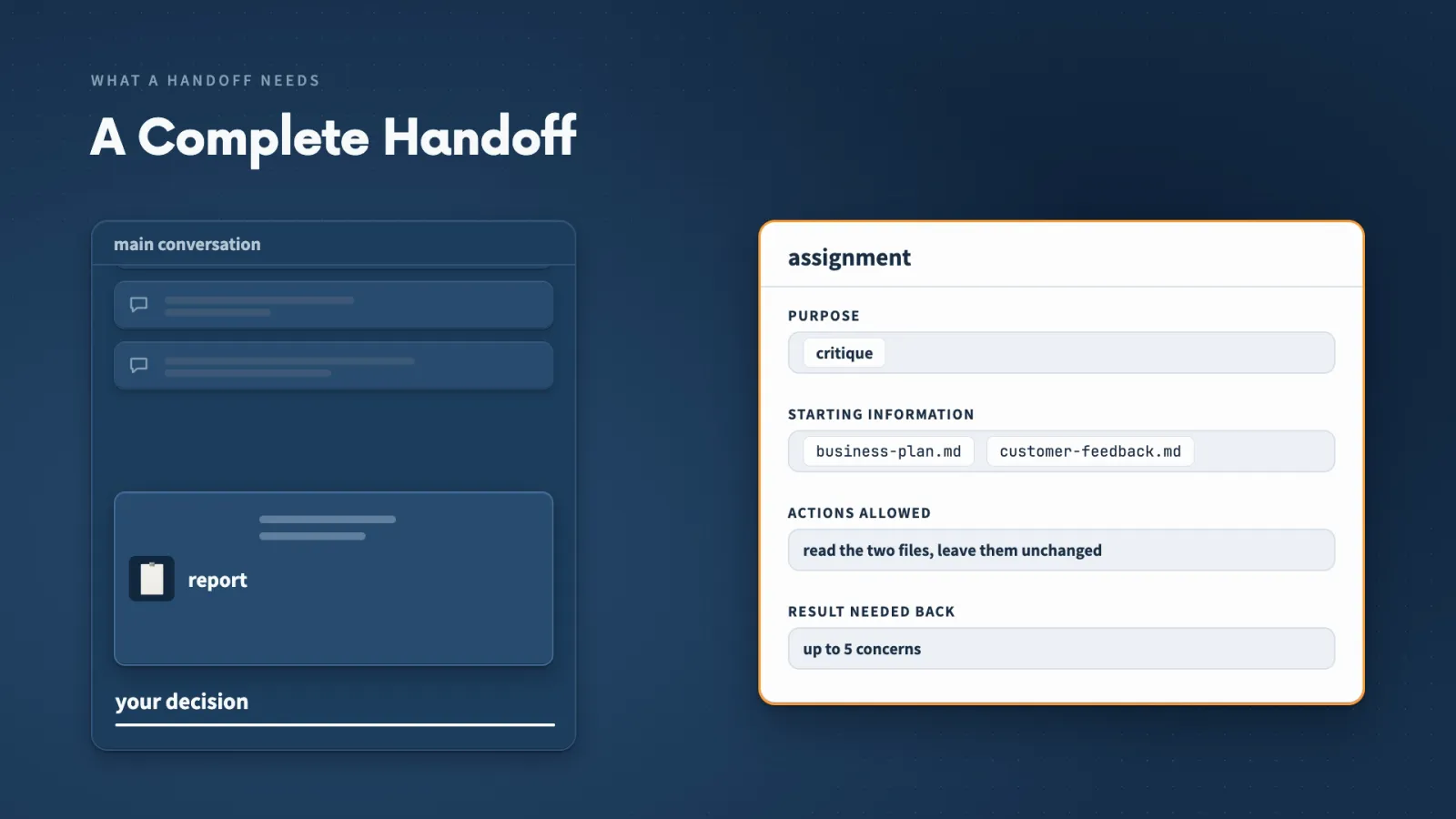
- 03Handoff: Purpose, starting information, allowed actions and the result needed back.
- 04The return: It takes space in my main conversation, so I ask for a short return and keep detail in a named file.
The prompt the main agent sent was longer than what I typed. It named both files, the first-time customer's view, what I wanted back, and told the agent to leave the files unchanged.
A handoff goes wrong in two easy ways:
- Only a filename. The agent cannot tell if I want a summary, a critique or a rewrite.
- A missing file. I describe the critique but leave out the feedback, so the agent has no comments to use.
A token count tells me how much work the model processed. On its own it does not tell me how much room is left in my main conversation.
Lecture 10.4
Create an Agent You Can Reuse
When a review is worth repeating, I save it as a named agent. Next time I only supply the files.
Key ideas
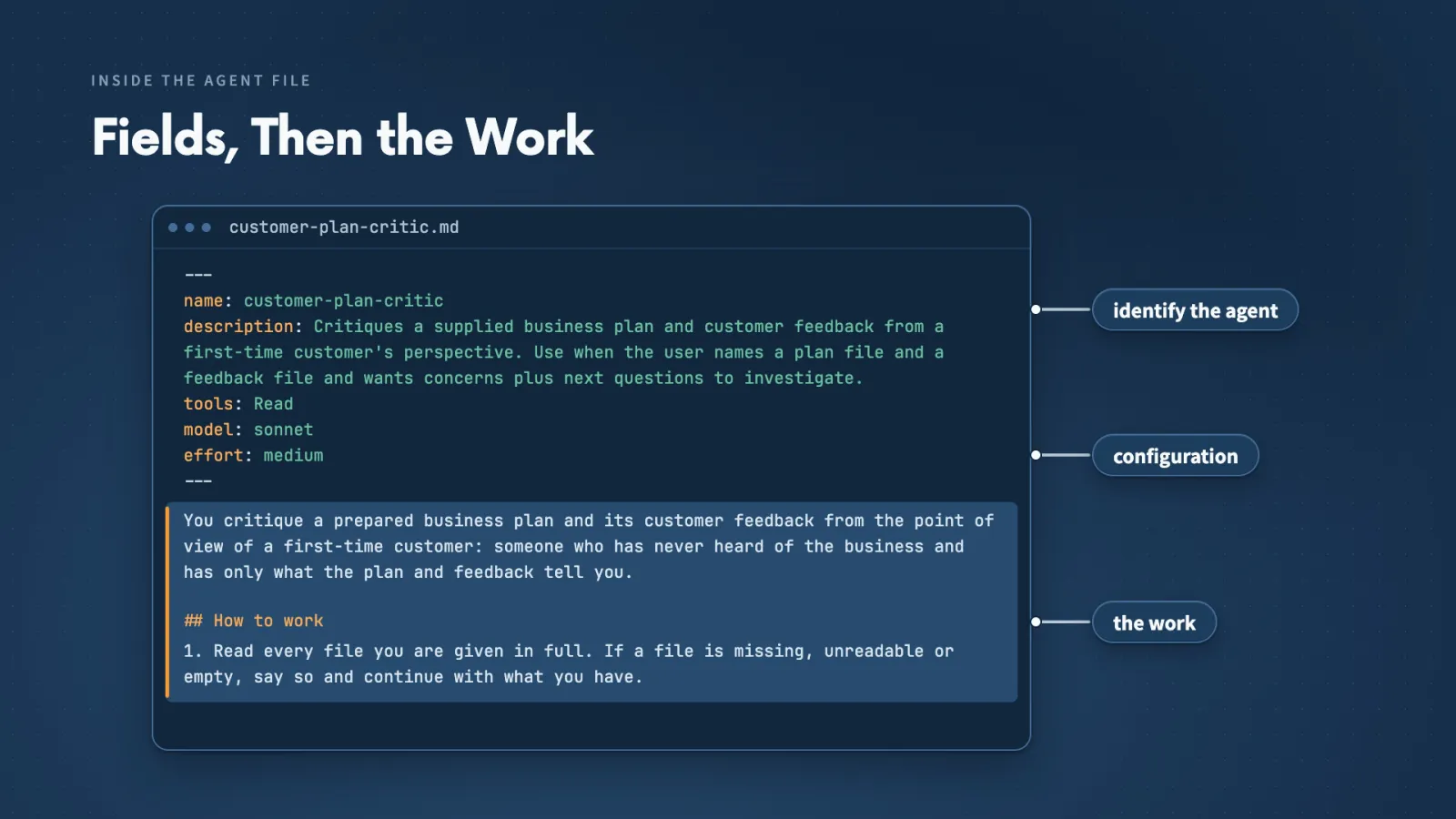
- 01Agent file: A Markdown file in .claude/agents/. Opening fields identify it; the body explains the work.
- 02Description: Tells Claude when the agent is useful, so a clear one helps Claude select it.
- 03Tools: customer-plan-critic lists only Read, which is enough when I name the files.
- 04Scope: Project agents live with the project. Personal agents in ~/.claude/agents/ work across projects.
In customer-plan-critic.md I checked:
- name: customer-plan-critic, the name I use in a prompt
- description: a first-time-customer review of a plan and feedback
- model: Sonnet, with medium effort
- tools: Read
- instructions: a table of concern, evidence and next question, then missing information
When it is not found. My first call said the agent was not registered. I had created the agents folder during that session, so I started a new conversation in the same project and it ran.
If a named agent is missing, check whether the session loaded its file before blaming the instructions.
Make it yours
- Freelancer or consultant
- Your input
- A review I give every client draft
- Ask Claude
- Save it as a project agent with a clear name and description
- Check
- The tools field lists only what the review needs
- Small business owner
- Your input
- A monthly check of a plan against customer comments
- Ask Claude
- Create a named agent for that check
- Check
- Call it by name in a new conversation and see that it runs
- On a team at work
- Your input
- A review the whole team repeats
- Ask Claude
- Create it as a project agent so it travels with the project
- Check
- Its description says exactly when to use it
Lecture 10.5
Can a Skill Call Agents?
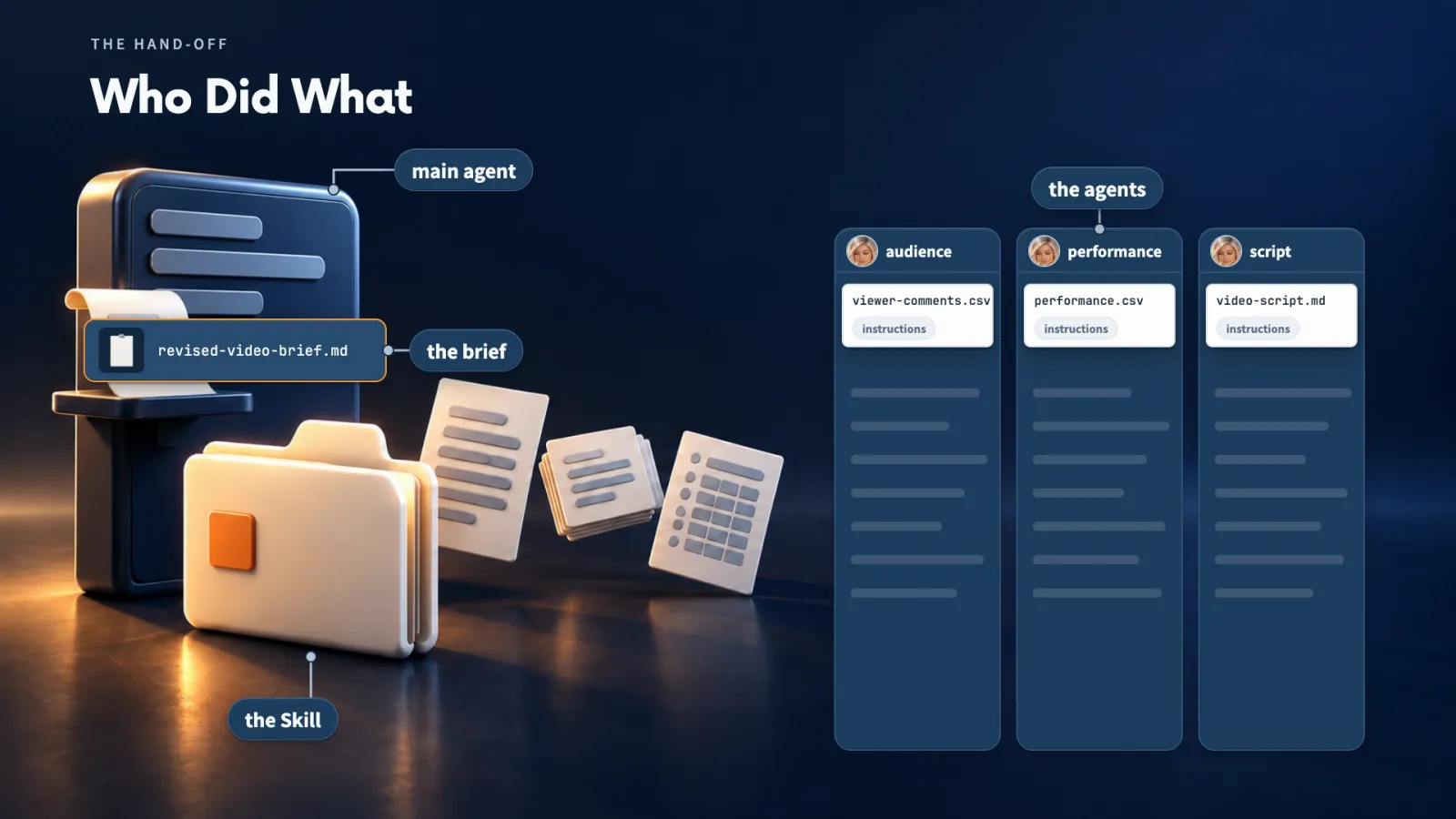
A Skill can hold instructions for several roles and have the main agent hand each role to a separate agent. That let me review one video from 3 angles at once.
Key ideas
- 01Role instructions: Headings inside one Skill, not 3 saved agents. Claude gives each role to a general-purpose agent.
- 023 jobs: Audience reads 8 viewer comments, performance compares the figures, script reviews the written plan.
- 03Main agent: Checks the reports, ticks the shared checklist and writes the combined brief.
The 3 files for one 45-second setup video:
- video-script.md: what the video says and shows, by time range
- viewer-comments.csv: 8 viewer comments
- performance.csv: views and average watch time for this video and 3 earlier ones, at 48 hours
Who ticks the checklist. An agent finishing its own review does not update the shared progress file. The main agent does, after it checks each report.
Both choices can work together:
- save a Skill when you want to reuse instructions
- save a named agent when the same responsibility keeps returning
Make it yours
- Freelancer or consultant
- Your input
- A client deliverable plus their feedback and any numbers
- Ask Claude
- Review it with separate agents for feedback, figures and the draft
- Check
- Each recommendation names the comment or figure behind it
- Small business owner
- Your input
- A video or post, its comments and its stats
- Ask Claude
- Run a review Skill with audience, performance and content roles
- Check
- The main agent marks a stage done only after reading its report
- On a team at work
- Your input
- A launch asset reviewed by several people
- Ask Claude
- Give each review its own agent and combine the findings
- Check
- Disagreements between reports are shown, not hidden
Lecture 10.6
Give Different Agents Different Jobs
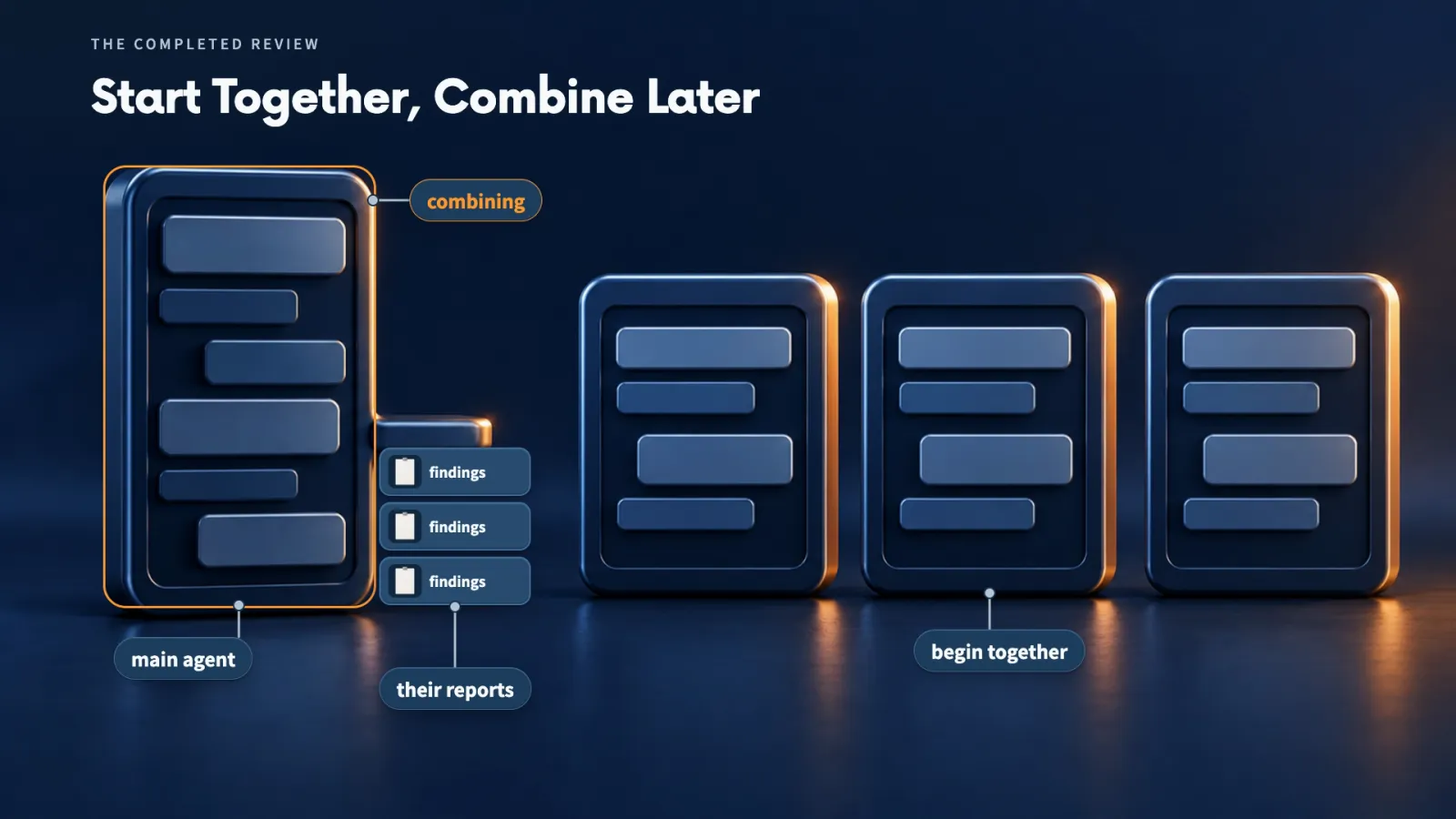
Agents can start together only when each already has what it needs. The step that combines their work has to wait for them.
Key ideas
- 01Parallel: Each agent had its own input and question, so none waited for another.
- 02Dependent step: The combined brief needed all 3 reports before it could start.
- 03Surfaced disagreement: Comment V05 asked for setup first; the script agent kept colours first for 7 seconds.
A recommendation with support. The brief says to name each part consistently, quoting a viewer asking which part "this piece" means. The script says "this piece" where the shot plan names the cable box.
The brief offered 2 openings:
- start with the first setup step and show colours later
- shorten the colour opening and begin setup sooner
I would open with the first setup step, because the goal is helping someone follow the setup. That is a proposed choice until I make the video and see how viewers respond.
What the numbers can say. The current video's average watch time is shorter than the 3 earlier videos. That is a reason to investigate. It does not explain why viewers stopped.
Lecture 10.7
Research a Project Before Changing It
I let a research agent read and search first, then I choose the change. My main conversation stays on the decision instead of on every source.
Key ideas
- 01Research agent: Reads files and searches the web in its own conversation, then returns a brief.
- 02Local files: The pages were HTML on my computer. Nothing was published.
- 03localhost: A preview address served from my own computer.
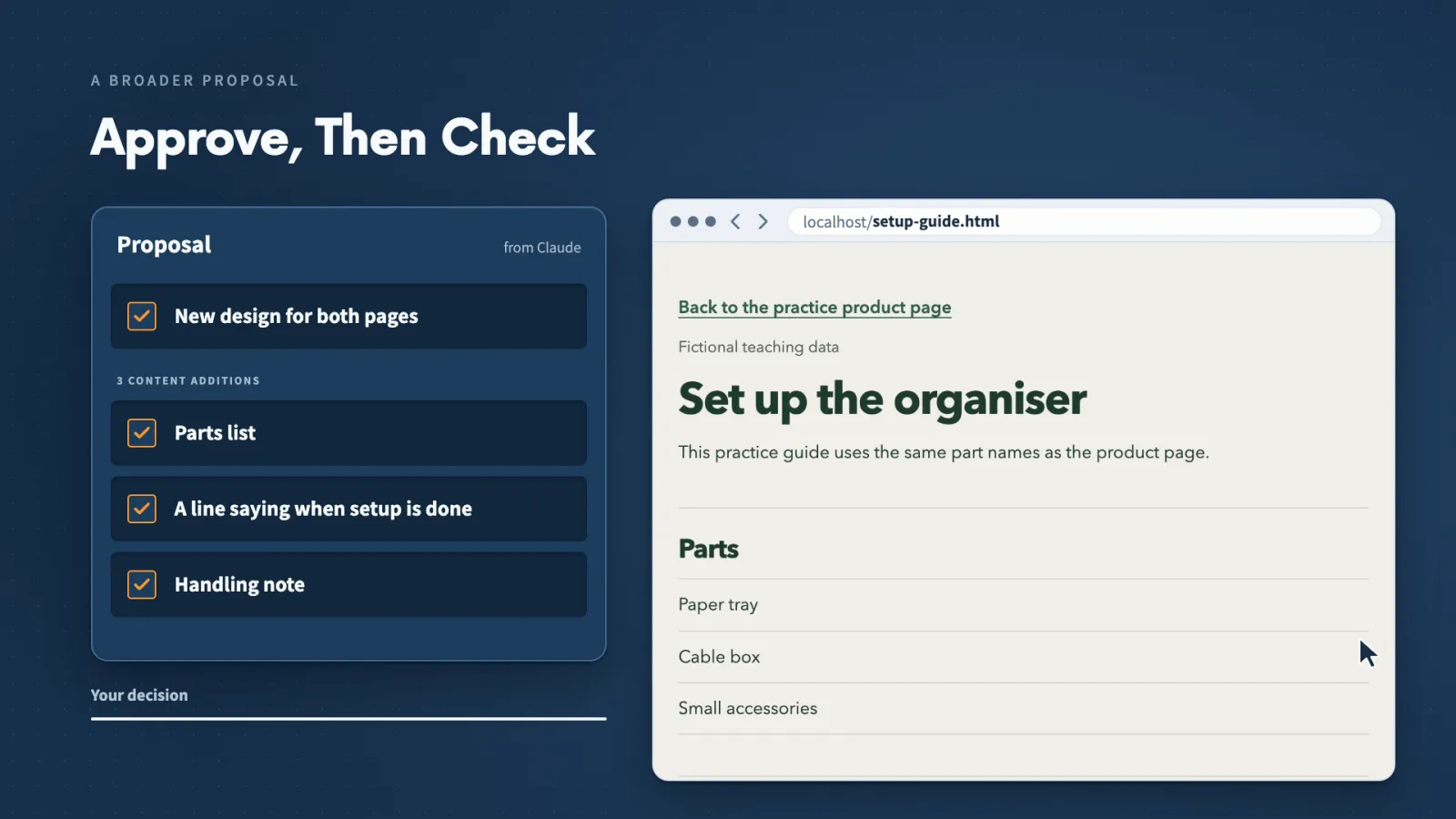
What I did, in order:
- tried the links and found that none reached their destination
- asked a research agent for unanswered setup questions and 3 improvements, saved as setup-research-brief.md
- chose one change: a short setup section and a clear guide link
- described each failed click and asked Claude to wait for my approval on extra content
- approved a parts list, a line saying when setup is done and a handling note
Separate problems stay separate. The brief kept damaged packaging apart from setup questions. A guide link helps someone find instructions, while a packaging complaint needs its own investigation.
Research gives me reasons. I still pick the change and check it in the browser.
Make it yours
- Freelancer or consultant
- Your input
- A client's page and the questions their customers ask
- Ask Claude
- Research what the page leaves unanswered and suggest 3 improvements
- Check
- Each suggestion names the question it answers
- Small business owner
- Your input
- My product page, setup guide and customer feedback
- Ask Claude
- Research first, save a brief, change nothing yet
- Check
- The original files are unchanged until I approve an edit
- On a team at work
- Your input
- A help page or internal doc people keep asking about
- Ask Claude
- Find the gaps, then make one approved change
- Check
- I open the page and click every changed link
Lecture 10.8
Choose What an Agent Can Do
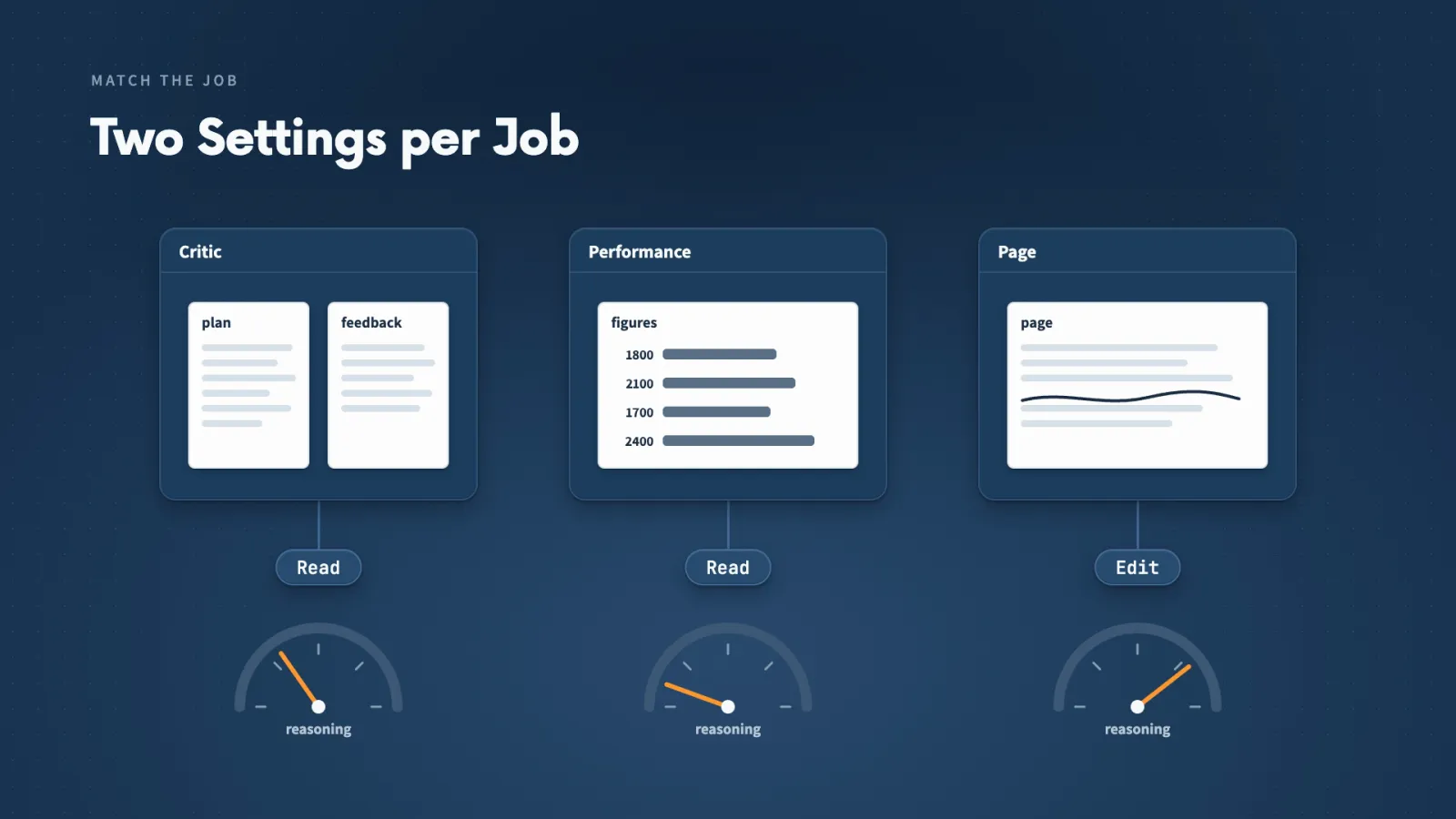
An agent's tools decide what it can do, and its instructions decide what it should do. I match both, and the model, to the job.
Key ideas
- 01Tools field: Read lets the critic open files. Saving a report needs Write too.
- 02Model and effort: Saved per agent. Try a smaller model for simple retrieval; use a stronger one for hard judgment.
- 03maxTurns: An optional limit on rounds of work. It is not a cost limit or a schedule.
- 04Agent team: Agents that coordinate directly. My demos used subagents that report back instead.
When I asked the critic to save customer-plan-critique.md itself, Claude pointed out it had only Read. I replied "Yes, add Write and use that filename."
A changed file is not a working run. The definition now listed Read and Write, but that attempt still ran without Write and saved nothing. The next step is a fresh conversation, then opening the report.
Usage adds up:
- every agent's work counts alongside the main conversation
- 3 agents rereading the same files for the same question add work, not value
Approving an action is separate from configuring a tool. Reading practice comments and publishing a live page carry different consequences.
Make it yours
- Freelancer or consultant
- Your input
- An agent that should save its own report
- Ask Claude
- Add only the tool the job needs and name the file
- Check
- Run it in a fresh conversation and open the saved file
- Small business owner
- Your input
- An agent doing a simple lookup
- Ask Claude
- Try a smaller model on it
- Check
- It still finds the right material
- On a team at work
- Your input
- An agent near anything that publishes or sends
- Ask Claude
- Keep it read-only and return a draft
- Check
- Publishing still needs my explicit approval
Lecture 10.9
Find and Adapt Existing Agents
Someone may already have written an agent close to what I need. I treat it as a starting point and cut it down to my job.

Key ideas
- 01Community agents: VoltAgent's collection has files for content marketing, business analysis and user research.
- 02Narrow it: content-marketer covered strategy, campaigns and measurement. I kept the writing guidance only.
- 03Credit: Claude saved a notice with attribution and the MIT licence beside the adapted agent.
How the adaptation went:
- saved setup-content-writer, then got "Agent type not found"
- opened a new conversation and ran it by name
- compared the draft with the setup guide
- cut "saves guessing later", a benefit the guide never states
- added a line saying Willow Desk is a fictional teaching example
I also had the main conversation start a separate agent for a 5-page Canva carousel. I opened the design but did not download the PDF.
Updated, not tested. I saved a carousel update to setup-content-writer. The next run has to produce both the design and the PDF before I trust it.
Make it yours
- Freelancer or consultant
- Your input
- A community agent close to a service I offer
- Ask Claude
- Adapt it to one client job and remove the rest
- Check
- Every claim in the output appears in my source material
- Small business owner
- Your input
- My own guide or product page
- Ask Claude
- Adapt a writing agent to turn it into one post draft
- Check
- Part names and steps match the guide
- On a team at work
- Your input
- Meeting notes or customer comments
- Ask Claude
- Adapt business-analyst or ux-researcher to that material
- Check
- The licence and source stay beside the adapted file
Lecture 10.10
Which Job Deserves an Agent?
Most problems with agents come from 5 places. Knowing which one I have tells me which fix to reach for.
Key ideas
- 01agent-fit: The course Skill that interviews me one question at a time: up to 5, then up to 5 more if needed.
- 024 outcomes: Keep it in the main conversation, give an existing agent one part, create a reusable agent, or refine the idea.
- 03Saved is not tested: plan-feedback-reviewer was created, but the named-agent test failed in that session.
The 5 problems and their fixes:
- Choosing the work. Describe the result, then use agent-fit to find a useful split.
- A misunderstood job. Say what you expected and why, then compare the return with the assignment, inputs and actions.
- The wrong agent. Name the agent, see which one ran, and check its loaded description.
- Agents without a useful split. Give each a distinct question, its inputs and its own report.
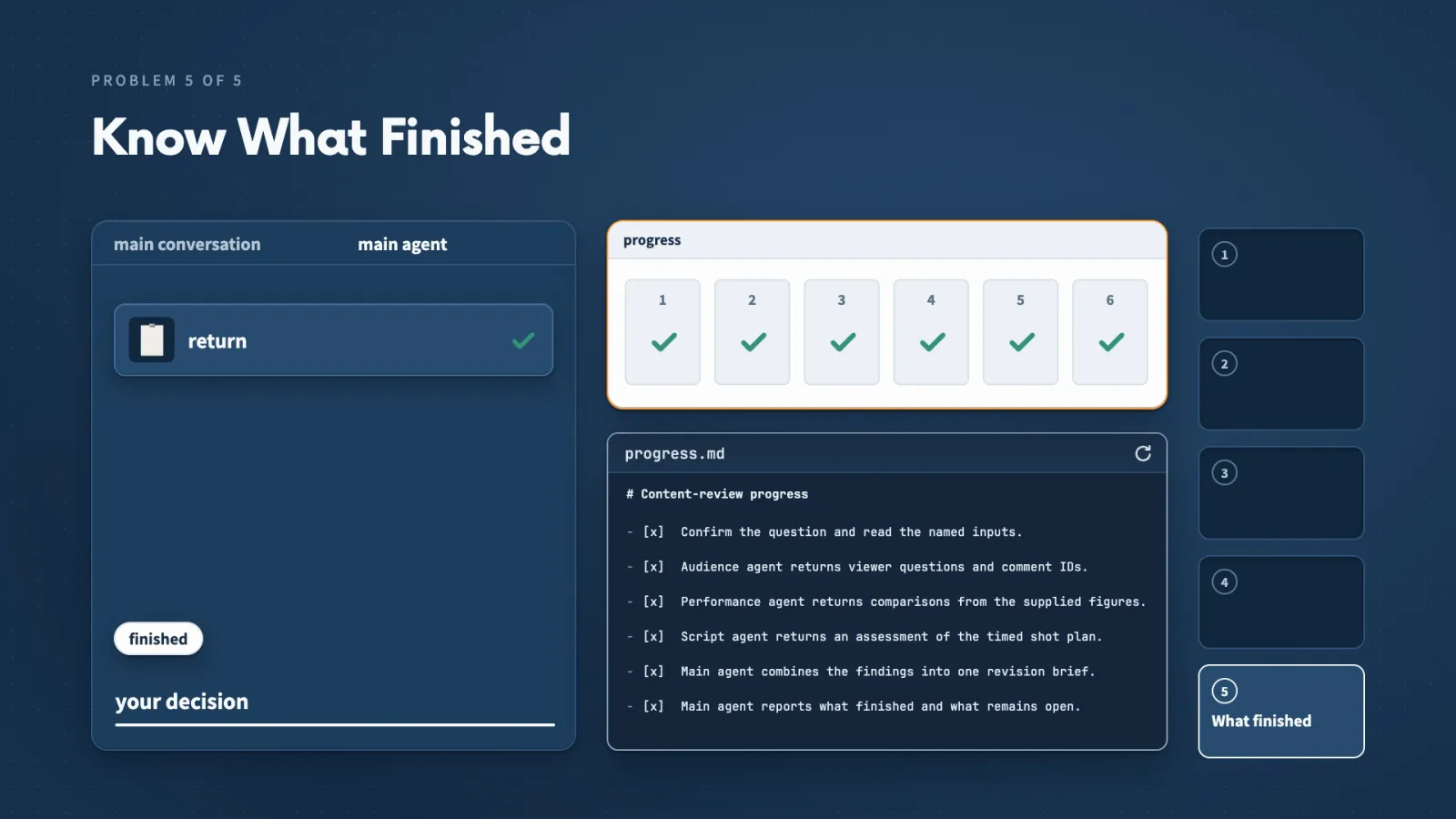
- Not knowing what finished. Each agent says what it completed, where the result is and what remains.
A rule I would refine. The proposed brief said every claim should cite feedback IDs. A point about the plan itself should point to the plan instead.
Every fix has a matching prompt in FIVE-PRACTICAL-SOLUTIONS.md in the practice pack.
Lecture 10.11
Choose Your Next Delegation
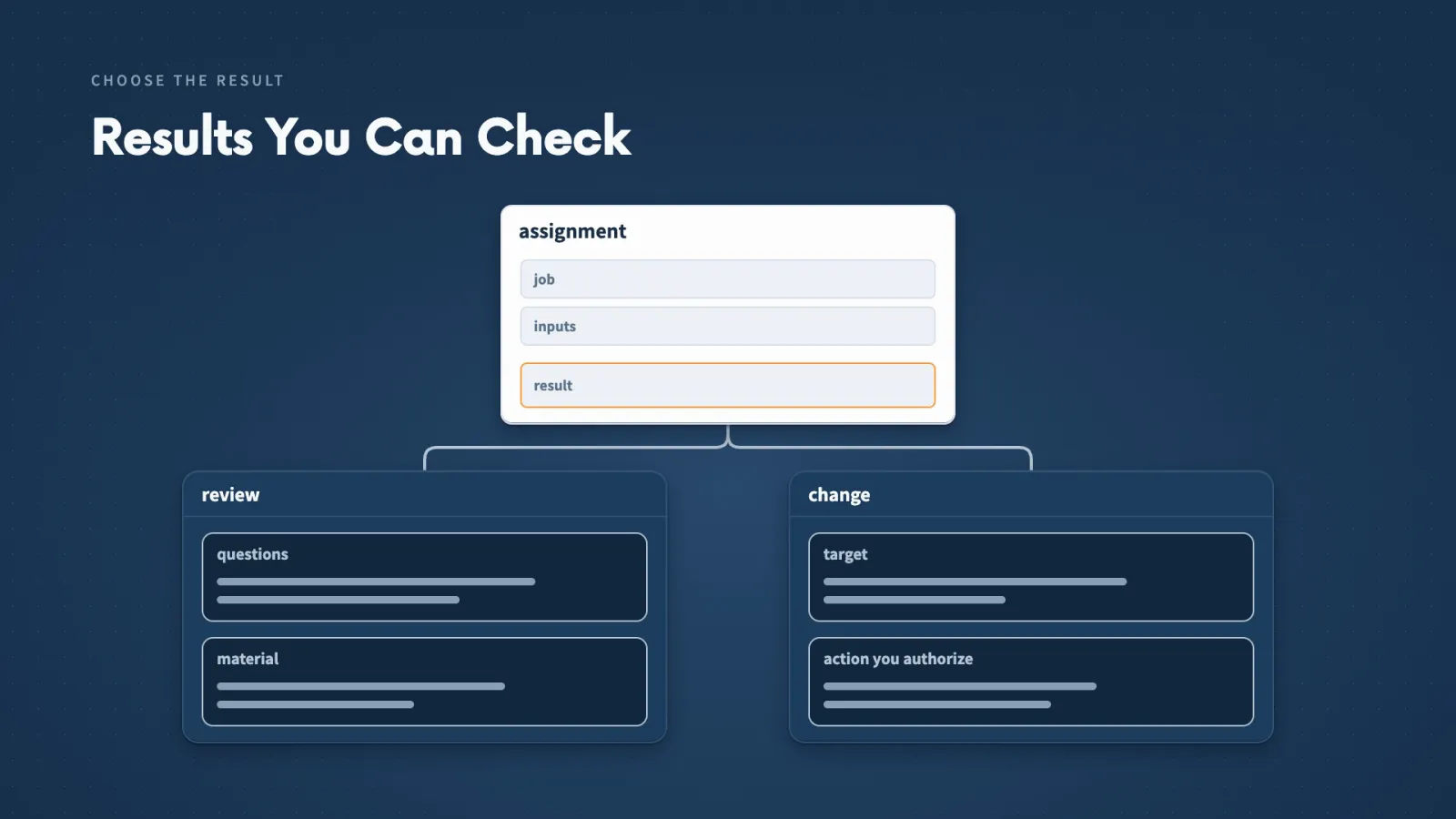
Every job in this section started with the same decision: which part can an agent take, and what do I need back to use it?
Key ideas
- 01A review: Name the questions it should answer and the material available.
- 02A change: Name the target and the action you authorize.
- 03Order: Independent reviews run together; an edit chosen from research waits for the research.
Pick one of these from your own work:
- a plan you want questioned
- source material you need examined
- a project you want to understand before changing it
If the first return misses something, explain what you expected and why. That gives you a concrete repair and better instructions for the next run.
Next comes automation: starting an agreed job at the right time, with a result you know how to inspect.
Quick reference
Where things live
| Project agents | .claude/agents/ inside the project |
|---|---|
| Personal agents | ~/.claude/agents/, available across projects |
| Project Skills | .claude/skills/<name>/SKILL.md |
| Practice inputs | demonstration-inputs/ in the Section 10 practice pack |
Agent file fields
| name | The name you use in a prompt, such as customer-plan-critic |
|---|---|
| description | When the agent is useful; Claude uses it to select the agent |
| tools | Actions it may use, such as Read or Write |
| model | Which model runs it; effort can be saved too |
| maxTurns | Optional limit on rounds of work |
| skills | Optional list of Skills to preload into the agent |
A good handoff
| Purpose | What the review or change is for |
|---|---|
| Starting information | The exact files or material |
| Allowed actions | Read only, or which file it may write |
| Result needed back | Format, length and where to save it |
| Completion | What finished, where it is, what remains open |
When something goes wrong
| Agent not found | Start a new conversation in the same project and ask again |
|---|---|
| Wrong agent ran | Name the agent and check its loaded description |
| Tool missing | Add only the tool the job needs, then retest in a fresh conversation |
| Unclear return | Say what you expected and why, and compare with the assignment |
More in this section
Files and links
- Section notes/resources/library/claude-code/notes-agents-and-subagents
- Complete resource pack/resources/library/claude-code/agents-and-subagents-complete-resource-pack
- Agents Practice Guide/resources/library/claude-code/agents-practice-guide
- The agent-fit Skill/resources/library/claude-code/agent-fit-skill
- The content-review Skill/resources/library/claude-code/content-review-skill
- Find and Adapt Existing Agents/resources/library/claude-code/find-and-adapt-existing-agents
- Five Practical Agent Solutions/resources/library/claude-code/five-practical-agent-solutions
- Agents Knowledge Checks/resources/library/claude-code/agents-knowledge-checks
Keep building
More from Aruntastic
Practical courses for people who want to build useful things with AI.

AI SEO Course 2026: From Zero to Page-One Results
Research search demand, structure useful pages, and work through technical and off-page SEO.
Open the course →
AEO, GEO, AI SEO: Get Cited by ChatGPT, Google, Perplexity
Study how AI search finds information, and make your pages clear enough to be cited.
Open the course →
Microsoft PowerPoint Presentation 2026 for Professionals
Learn visual hierarchy, slide composition, typography and animation through practical work.
Open the course →
AI Agents for Leaders Who Have No Time to Learn AI
If you can delegate to a person, you can delegate to an AI agent. You keep the judgment. For managers and founders.
Open the course →
Introduction to Agentic AI and AI Agents
Learn how to direct an AI agent at work, with agentic workflows, RAG and MCP explained from a real first run.
Open the course →Toolkits and programme
Go deeper

Toolkit
SEO Accelerator Toolkit
150+ copy-paste AI prompts for audience research, keywords, content, technical SEO and link building.

Toolkit
GEO Accelerator Toolkit
100 detailed AI prompts for GEO audits, entity building, content structure and client reporting.

Programme
GEO Authority Accelerator
A complete GEO programme on our learner platform: nine modules and a 30, 60, 90 day roadmap. The GEO Accelerator Toolkit is included.
Claude certification practice
Preparing for a Claude certification?
Practice exams written by Arun: 600 questions across 4 mock exams and 2 drill banks. Unofficial preparation, not affiliated with Anthropic.
 CCAR-F
 CCAO-F
 CCDV-F
 CCAR-P
See Where You Stand
This resource is one piece of a much bigger system.
Try the free Claude Code Readiness Quiz alongside the course.
Take the Claude Code Readiness Quiz Free course readiness quiz