AI SEO Course · Know Your Audience & Competitors
Steal Competitor Ideas! (Using Ubersuggest from a Domain)
 Arun Nagarathanam · 10 Jul 2026 Guide · 6 of 54 in this course
 An exclusive resource for students of Arun's AI SEO Course.
Updated Interface: Steal Competitor Ideas! (Using Ubersuggest from a Domain)
Note
The Ubersuggest interface has been updated since this section was recorded. The core process and all the data you saw in the lecture are exactly the same. This guide shows you the current layout so you can follow along without confusion.
Note
Know Your Audience & Competitors
Why Competitor Keywords Matter
Analyzing a competitor's domain in Ubersuggest reveals the keywords already proven to drive traffic in your niche. It is a fast way to discover topics you may have missed and spot gaps where you can outperform them.
Know Your Audience & Competitors
What Has Changed in the Interface
In the recorded lecture, you entered the competitor domain, selected a combined language and location dropdown, and clicked Search.
In the current interface, the flow works like this:
Follow along
- Open app.neilpatel.com and log in.
- In the left sidebar, under Keyword Research, click AI Keyword Overview.
- In the search bar, enter your competitor's domain (for example,
aquariumcoop.com). - Select your Language and Location from the two separate dropdowns.
- Click AI Search.
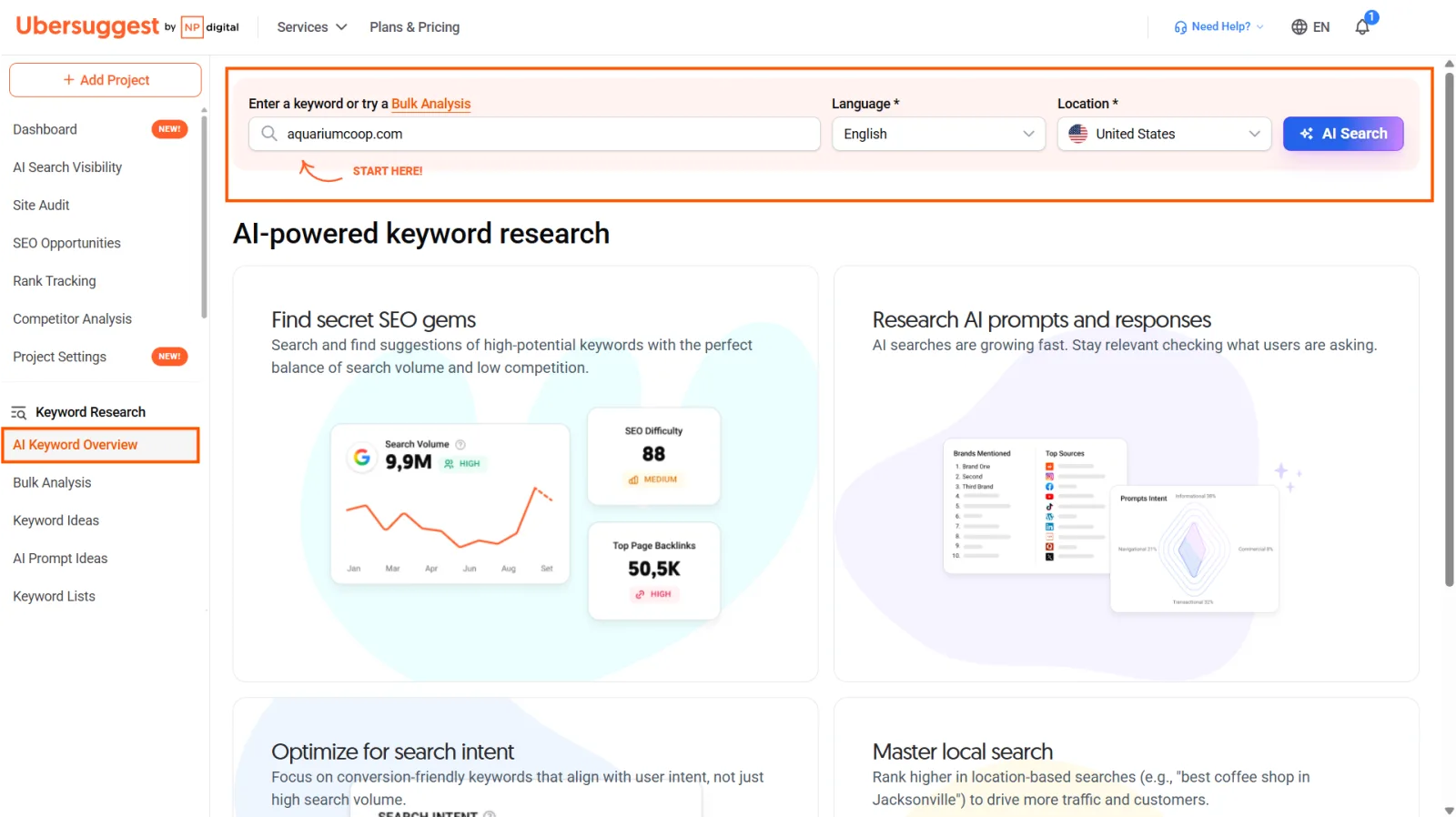
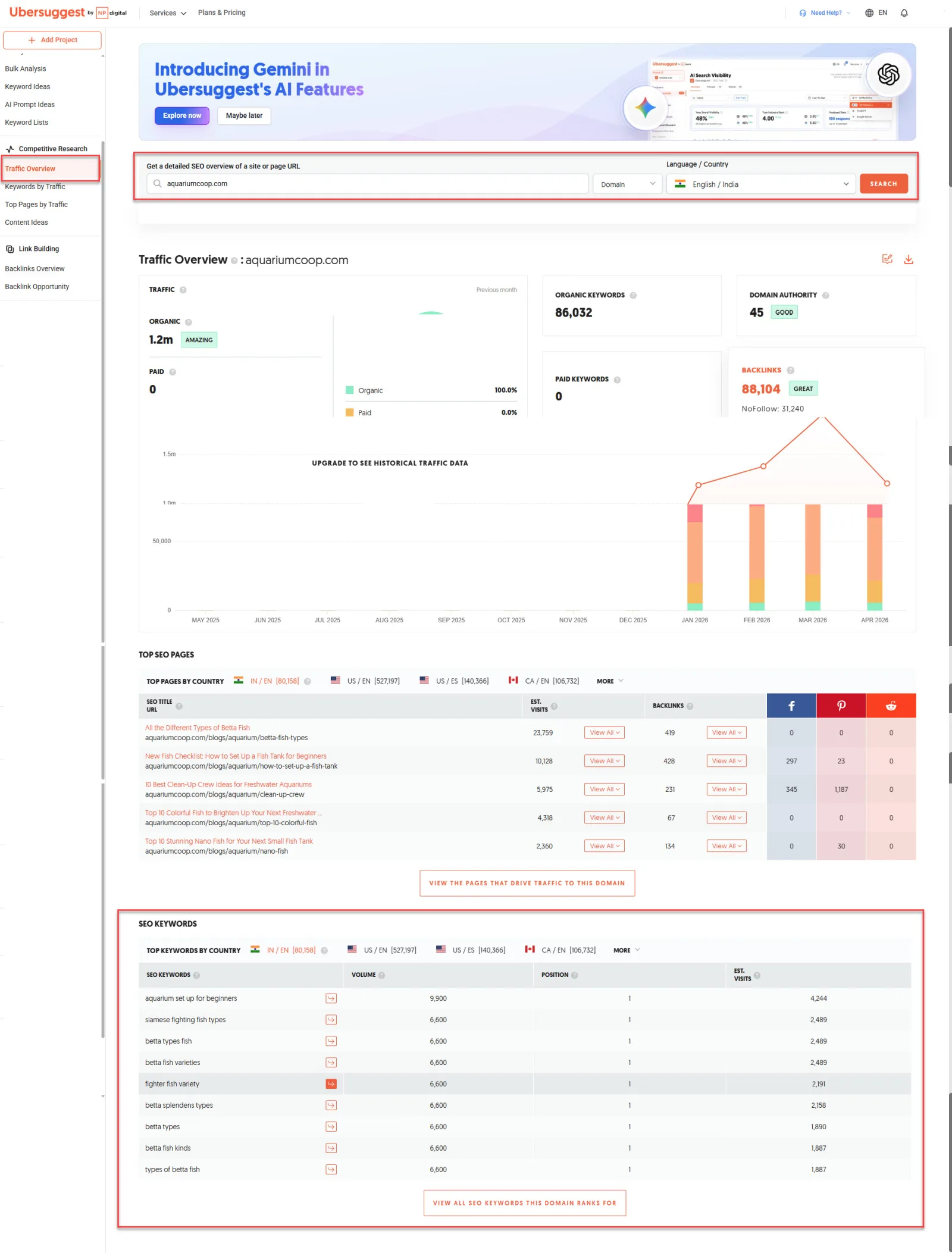
Once results load, you will land directly on the Traffic Overview page under Competitive Research. All the data you saw in the lecture, including SEO Keywords, ranking positions, and estimated visits, is displayed there exactly as before.
This article supplements the video lecture on competitor keyword research in Ubersuggest. A refreshed video walkthrough of the updated interface will be added to this section shortly.


Keep building
More from Aruntastic
Practical courses for people who want to build useful things with AI.

AI SEO Course 2026: From Zero to Page-One Results
Research search demand, structure useful pages, and work through technical and off-page SEO.
Open the course →
AEO, GEO, AI SEO: Get Cited by ChatGPT, Google, Perplexity
Study how AI search finds information, and make your pages clear enough to be cited.
Open the course →
Microsoft PowerPoint Presentation 2026 for Professionals
Learn visual hierarchy, slide composition, typography and animation through practical work.
Open the course →
AI Agents for Leaders Who Have No Time to Learn AI
If you can delegate to a person, you can delegate to an AI agent. You keep the judgment. For managers and founders.
Open the course →
Introduction to Agentic AI and AI Agents
Learn how to direct an AI agent at work, with agentic workflows, RAG and MCP explained from a real first run.
Open the course →Toolkits and programme
Go deeper

Toolkit
SEO Accelerator Toolkit
150+ copy-paste AI prompts for audience research, keywords, content, technical SEO and link building.

Toolkit
GEO Accelerator Toolkit
100 detailed AI prompts for GEO audits, entity building, content structure and client reporting.

Programme
GEO Authority Accelerator
A complete GEO programme on our learner platform: nine modules and a 30, 60, 90 day roadmap. The GEO Accelerator Toolkit is included.
Claude certification practice
Preparing for a Claude certification?
Practice exams written by Arun: 600 questions across 4 mock exams and 2 drill banks. Unofficial preparation, not affiliated with Anthropic.
 CCAR-F
 CCAO-F
 CCDV-F
 CCAR-P
See Where You Stand
This resource is one piece of a much bigger system.
Take the free GEO Readiness Quiz to see exactly where your business stands with AI search engines today.
Take the GEO Readiness Quiz 60 seconds · Personalized report · Free