Free guide · Claude, April to October 2026
Open the 3 Claude upgrades worth your week
Anthropic never launched anything called Claude 2.0. YouTube videos used that name for a set of separate launches between 14 April and 8 October 2026. This guide lists the real dates and walks through the 3 upgrades that help everyday work, with what each one needs.
 Arun Nagarathanam · 30 Oct 2026
Start here
There is no "Claude 2.0"
Two popular YouTube videos called the recent changes "Claude 2.0": Ben AI's (706,618 views) and RoboNuggets' (661,197 views, both counted on 30 October). Anthropic's own pages and release notes use no such name. Claude 2.0 was a model from 2023.
What changed arrived as separate launches:
The real dates
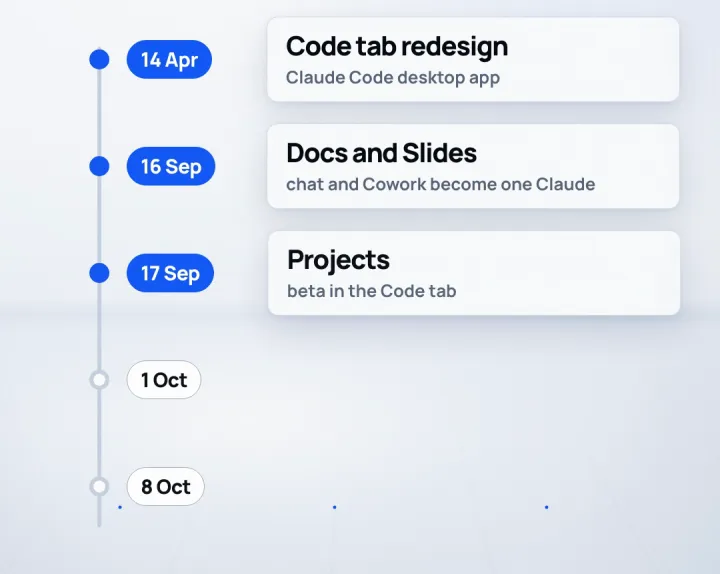
- 0114 April 2026: a redesign of the Claude Code desktop app (the Code tab), built to run more tasks at once, with side chats.
- 0216 September: chat and Cowork became one Claude, with new Claude Docs and Claude Slides, and Claude Design inside any conversation.
- 0317 September: Projects, a beta in the Code tab for select Pro and Max users.
- 041 October: Mods, small functions that change how Claude Code works (aimed at developers).
- 058 October: Claude Dashboards (beta, paid plans) and Claude Motion (beta, Team and Enterprise). Docs, Slides and Design reached every plan, including Free.
Every plan, including Free
Upgrade 1: Docs, Slides and Design
Make a deck in a conversation
- Open Claude in any conversation. You do not need the Code tab or a paid plan for this one.
- Ask for the document, deck or design you need, in plain words, with the facts it should use.
- Edit the result in the same conversation until it reads right.
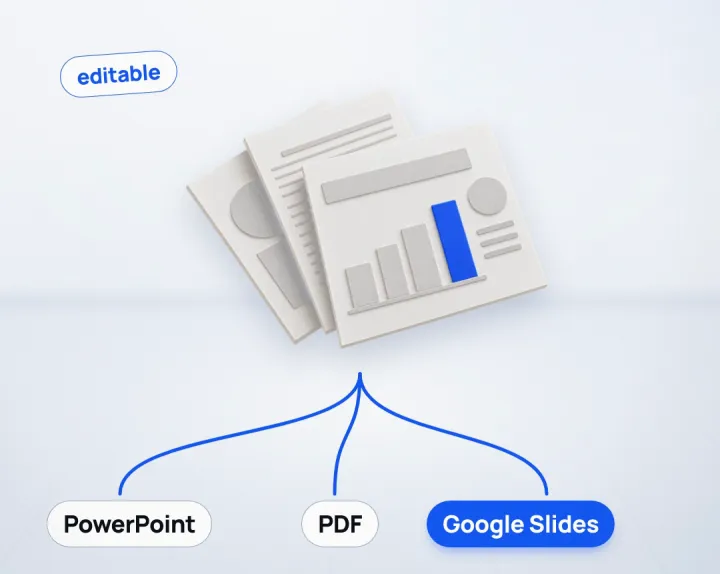
- Download a deck as PowerPoint or PDF, or send it to Google Slides.
Paid plan
Open the Code tab
Upgrades 2 and 3 live in the Code tab of the Claude Desktop app. It needs a paid plan: Pro, Max, Team or Enterprise. No Node.js or command line is needed.
First session
- Install Claude Desktop (macOS or Windows; Linux is in beta) and sign in on a paid plan.
- Click the Code tab.
- Pick a folder, type what you want done in plain language, and start the session.
Code tab
Upgrade 2: side chat and split view
Ask without stopping the task
- While a longer task runs, press Cmd and ; on a Mac, or Ctrl and ; on Windows, to open a side chat.
- Ask your quick question there. The main task keeps going.
- For a second task, click + New (Cmd or Ctrl + N).
- Option-click (Mac) or Alt-click (Windows) a session in the sidebar to see two tasks side by side.
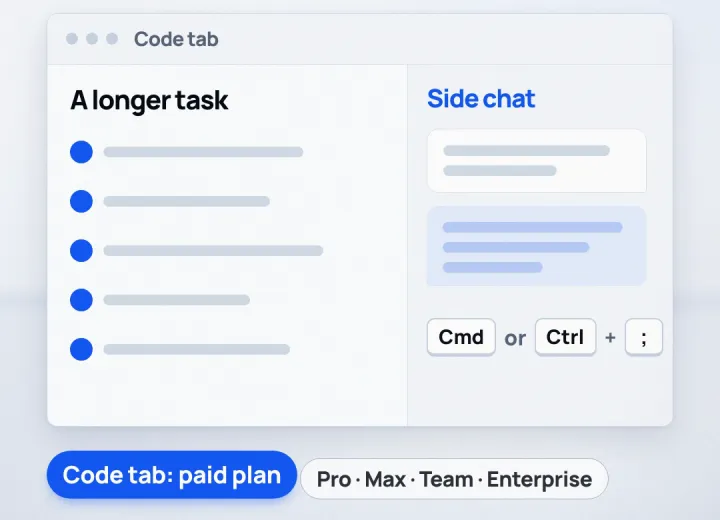
The side chat and split view need a recent Claude Desktop build. If you do not see them, update the app.
Beta, select Pro and Max users
Upgrade 3: Projects
Anthropic describes a project as "one ongoing conversation where Claude coordinates the work for you." You describe a job with several parts, and Claude splits it into threads that run in the cloud, so the work can continue with your laptop closed.
Start a project
- Look for Projects in the Code tab sidebar, or under More. It is rolling out gradually; if it is not there yet, join the waitlist (link below).
- Create a project with a name, the goal Claude should work towards, and the folder it should use.
- Give it your list of tasks. Claude starts a thread for each one and reports back in the main conversation.
- Check in when a thread needs you, from your computer or your phone.
A note on Mods: they run with the same access as Claude Code and are not sandboxed, so install only mods from sources you trust.
Files and links
- Anthropic: Docs, Slides, Design on every plan; Dashboards and Motionhttps://claude.com/resources/articles/dashboards-and-motion
- Claude Code desktop docs (side chat, split view)https://code.claude.com/docs/en/desktop
- Claude Code desktop quickstarthttps://code.claude.com/docs/en/desktop-quickstart
- Claude Code Projects docshttps://code.claude.com/docs/en/claude-projects
- Projects waitlisthttps://claude.com/form/projects
- Anthropic's Projects video on YouTubehttps://www.youtube.com/watch?v=omihvjf0A2k
- Claude release noteshttps://support.claude.com/en/articles/12138966-release-notes
Keep building
More from Aruntastic
Practical courses for people who want to build useful things with AI.

AI SEO Course 2026: From Zero to Page-One Results
Research search demand, structure useful pages, and work through technical and off-page SEO.
Open the course →
AEO, GEO, AI SEO: Get Cited by ChatGPT, Google, Perplexity
Study how AI search finds information, and make your pages clear enough to be cited.
Open the course →
Microsoft PowerPoint Presentation 2026 for Professionals
Learn visual hierarchy, slide composition, typography and animation through practical work.
Open the course →
AI Agents for Leaders Who Have No Time to Learn AI
If you can delegate to a person, you can delegate to an AI agent. You keep the judgment. For managers and founders.
Open the course →
Introduction to Agentic AI and AI Agents
Learn how to direct an AI agent at work, with agentic workflows, RAG and MCP explained from a real first run.
Open the course →Toolkits and programme
Go deeper

Toolkit
SEO Accelerator Toolkit
150+ copy-paste AI prompts for audience research, keywords, content, technical SEO and link building.

Toolkit
GEO Accelerator Toolkit
100 detailed AI prompts for GEO audits, entity building, content structure and client reporting.

Programme
GEO Authority Accelerator
A complete GEO programme on our learner platform: nine modules and a 30, 60, 90 day roadmap. The GEO Accelerator Toolkit is included.
Claude certification practice
Preparing for a Claude certification?
Practice exams written by Arun: 600 questions across 4 mock exams and 2 drill banks. Unofficial preparation, not affiliated with Anthropic.
 CCAR-F
 CCAO-F
 CCDV-F
 CCAR-P
Free skills pack
Seven ready-made Claude Code skills, free.
The First Seven is a free pack of seven Claude Code skills for marketers, SEO consultants and presentation professionals. The Claude Code Without Coding course teaches you to hand repetitive work to Claude step by step.
Get The First Seven Free on GitHub · No email form