Free guide · Claude Code
Build your own Mac app with Claude Code
Many people pay for small Mac apps that each do one job. Dave Ebbelaar released BAMA, a free set of skills that walks Claude Code from an idea, through a plan and tests, to a finished app on your Mac. This guide covers what you need, how to install it, and a first small app to try.
 Arun Nagarathanam · 30 Oct 2026
Start here
What BAMA is
BAMA is short for Build Any Mac App. It is a free, MIT-licensed collection of skills on GitHub by Dave Ebbelaar. A skill is a set of written instructions that Claude Code reads and follows. BAMA's 21 skills cover the whole job of making a native Mac app: the idea, the plan, the code, the design and the finished app in your Dock.
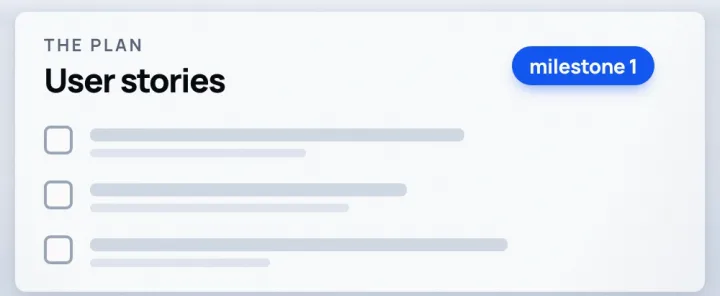
Its README describes three steps. Claude Code can take screenshots of every screen of an app you like and list them. It turns those screens into user stories, small descriptions of what each part should do, each with checks you can tick off. Then it builds one story at a time, and before saving each one it takes a picture of every page in light and dark mode and runs the tests.
In his video, Dave says he built an app that replaces 10 apps he was using on his MacBook. That is his own result. Yours depends on the app you ask for.
Five minutes
Before you start
What you need
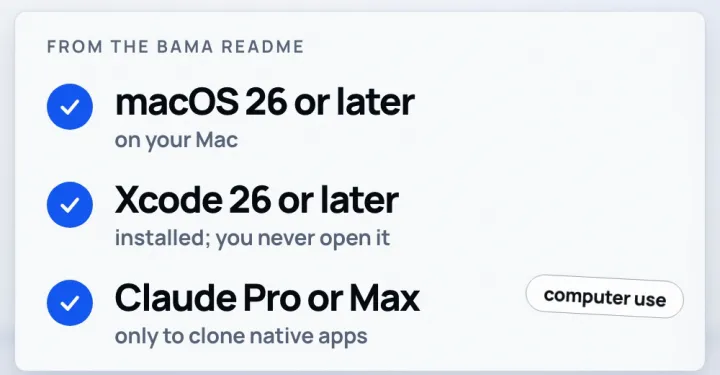
- 01A Mac on macOS 26 or later.
- 02Xcode 26 or later installed. It is Apple's app-building software and a free download from the Mac App Store. BAMA uses its tools in the background, and the README says you never open it.
- 03Claude Code, the agent that runs the skills.
- 04Only if you want to copy an existing native Mac app with the clone skill: computer use, which needs Claude Pro or Max.
Two commands
Install BAMA in Claude Code
Install
- Open Claude Code.
- Paste the first command below and press Enter. It adds BAMA's plugin marketplace.
- Paste the second command and press Enter. It installs the BAMA plugin with all 21 skills.
- Use one install route only. The README also offers an npx command in Terminal, but it warns that two routes install every skill twice.
/plugin marketplace add daveebbelaar/bama
/plugin install bama@bama
A small first win
Your first app: a window snapper
BAMA's specs folder has 12 written build plans for small Mac apps, taken from Dave's own menu bar app. Starting from one means Claude Code has a clear, small target.
Build it
- Make a new, empty folder for the app.
- Open BAMA's specs folder on GitHub (link at the end), open window-snapper.md and copy the file into your empty folder.
- Open Claude Code in that folder and send the prompt below.
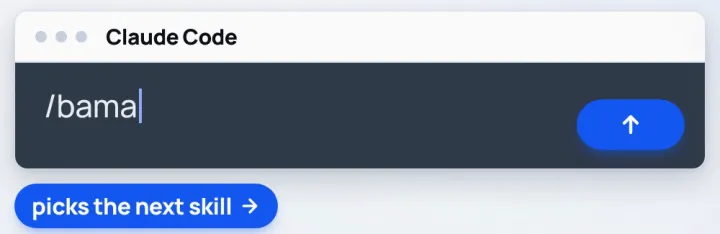
- Read what Claude Code plans before it goes ahead, and answer its questions. If you lose track of where you are, type /bama: it looks at your project and picks the next skill.
Build the app in window-snapper.md with BAMA.
/bama
Other plans in the same folder include a window switcher, a launcher, clipboard history, screenshots and a screen recorder. Each works the same way: copy the file into an empty folder and name it in the prompt.
The map
The skills, in the order you meet them
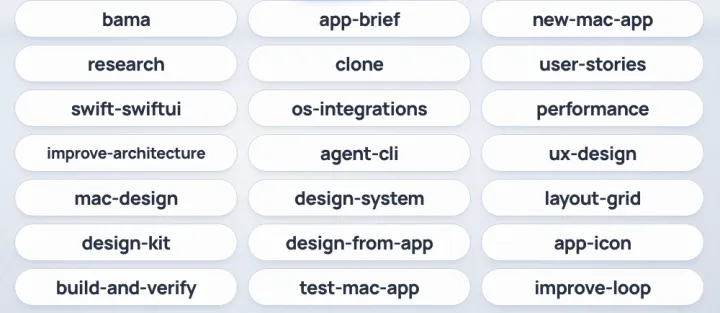
Five stages, 21 skills
- 01Start: bama (finds where you are and calls the right skill), app-brief (turns an idea into a one-page brief), new-mac-app (a working starter app).
- 02Plan: research (helper agents look at the market, users, features, design and macOS), clone (screenshots every screen of an app you like), user-stories (the to-do list for the build, with checks).
- 03Code: swift-swiftui, os-integrations (hotkeys, menu bar, windows, screen capture), performance, improve-architecture, and the optional agent-cli so agents can drive your app.
- 04Design: ux-design, mac-design, design-system, layout-grid, design-kit, design-from-app (rebuilds the look of an app you like) and app-icon.
- 05Ship: build-and-verify (builds, installs and checks every page in light and dark), test-mac-app, and improve-loop (works through the list one story at a time).
Grow it
After the first app
Once the first version runs, you add to it by asking Claude Code in the same project. In his video, Dave grew his own app one piece at a time: a window snapper, then a switcher, then a launcher, then a home screen.
You can also start from an app you already like. This is the example prompt from the README. For a native Mac app it needs computer use (Claude Pro or Max), because Claude Code has to open the app and take the screenshots itself.
Clone my to-do app as a native Mac app.
Screenshot every screen, write the user stories, and build milestone 1.
Files and links
- BAMA on GitHub (README, install, requirements)https://github.com/daveebbelaar/bama
- BAMA's 12 build plans (specs folder)https://github.com/daveebbelaar/bama/tree/main/specs
- Xcode on the Mac App Storehttps://apps.apple.com/app/xcode/id497799835
- Dave Ebbelaar's video on YouTubehttps://www.youtube.com/watch?v=gN6wl-OX8-Q
Keep building
More from Aruntastic
Practical courses for people who want to build useful things with AI.

AI SEO Course 2026: From Zero to Page-One Results
Research search demand, structure useful pages, and work through technical and off-page SEO.
Open the course →
AEO, GEO, AI SEO: Get Cited by ChatGPT, Google, Perplexity
Study how AI search finds information, and make your pages clear enough to be cited.
Open the course →
Microsoft PowerPoint Presentation 2026 for Professionals
Learn visual hierarchy, slide composition, typography and animation through practical work.
Open the course →
AI Agents for Leaders Who Have No Time to Learn AI
If you can delegate to a person, you can delegate to an AI agent. You keep the judgment. For managers and founders.
Open the course →
Introduction to Agentic AI and AI Agents
Learn how to direct an AI agent at work, with agentic workflows, RAG and MCP explained from a real first run.
Open the course →Toolkits and programme
Go deeper

Toolkit
SEO Accelerator Toolkit
150+ copy-paste AI prompts for audience research, keywords, content, technical SEO and link building.

Toolkit
GEO Accelerator Toolkit
100 detailed AI prompts for GEO audits, entity building, content structure and client reporting.

Programme
GEO Authority Accelerator
A complete GEO programme on our learner platform: nine modules and a 30, 60, 90 day roadmap. The GEO Accelerator Toolkit is included.
Claude certification practice
Preparing for a Claude certification?
Practice exams written by Arun: 600 questions across 4 mock exams and 2 drill banks. Unofficial preparation, not affiliated with Anthropic.
 CCAR-F
 CCAO-F
 CCDV-F
 CCAR-P
Free skills pack
Seven ready-made Claude Code skills, free.
The First Seven is a free pack of seven Claude Code skills for marketers, SEO consultants and presentation professionals. The Claude Code Without Coding course teaches you to hand repetitive work to Claude step by step.
Get The First Seven Free on GitHub · No email form